
Microsoft Agent Framework for .NET (part 1): what it is, how it works, and when to use it
Microsoft Agent Framework is Microsoft’s production-oriented framework for building AI agents and multi-agent workflows in .NET and Python. Let’s see how it works, why Microsoft created it, and when to choose it over Semantic Kernel, LangChain, or AutoGen.
Table of Contents
Just a second! 🫷
If you are here, it means that you are a software developer. So, you know that storage, networking, and domain management have a cost .
If you want to support this blog, please ensure that you have disabled the adblocker for this site. I configured Google AdSense to show as few ADS as possible - I don't want to bother you with lots of ads, but I still need to add some to pay for the resources for my site.
Thank you for your understanding.
- Davide
If you have been following the Microsoft AI ecosystem, you have probably seen a lot of moving pieces: Azure AI Foundry, Azure OpenAI, Semantic Kernel, GitHub Copilot integrations, MCP, A2A, and of course Microsoft.Extensions.AI. At some point the obvious question becomes: “Ok, what should I use to build a real agent-based application in .NET?”
- Microsoft Agent Framework for .NET (part 1): what it is, how it works, and when to use it
- Microsoft Agent Framework for .NET (part 2): How to use IChatClient with Azure Foundry and Ollama in .NET
- Microsoft Agent Framework for .NET (part 3): Custom Agents, for building a chat with custom instructions
- Microsoft Agent Framework for .NET (part 4): static methods, instance methods, MCP Clients as custom Agent tools
In this first article of a new series on Microsoft Agent Framework, we will answer that question. We will see what Microsoft Agent Framework is, the design philosophy behind it, how it fits into the broader Microsoft AI stack, and when it can be a better fit than alternatives like Semantic Kernel, LangChain, and AutoGen.
Throughout this series, we will use a simple running example: a board game management application (have I ever mentioned that I LOVE board games?? 🤩).
This application will do things like:
- discover new board games
- track owned games and play sessions
- get recommendations based on player count, complexity, and play time
- coordinate follow-up actions such as sending reminders or updating a shared collection.
That kind of app is small enough to explain in a blog post, but rich enough to show why a plain chatbot is not always enough.
What is Microsoft Agent Framework?
At a high level, Microsoft Agent Framework (often shortened to MAF) is Microsoft’s open-source framework for building AI agents and multi-agent workflows in .NET and Python.
Just to avoid confusion: in the Microsoft ecosystem you may also run into the Microsoft 365 Agents SDK. That is a different product, focused on channels and integrations such as Teams and Copilot Studio. In this article, we are talking about the framework hosted in the microsoft/agent-framework repository and the Microsoft.Agents.AI.* packages.
The key idea is simple: instead of treating an LLM call as an isolated prompt/response operation, MAF gives you a structured way to build software systems where:
- an agent has instructions, identity, and capabilities
- the agent can use tools to act on external systems
- conversations can keep track of session state
- multiple agents can collaborate through workflows and orchestration
- the whole application can be hosted, observed, and evolved like a normal production system
So MAF is not “just another wrapper around a model API”, but a complete application framework for agentic systems.
Why Microsoft built it: the design philosophy
In my opinion, one of the most interesting parts of Microsoft Agent Framework is not the syntax (we will see in future articles that it’s nothing particularly difficult), but its positioning in relation to the rest of the .NET world.
In many blogs and tech talks, you see demos built around just some basic pieces: a model, a prompt, maybe a tool or two. That is great for experimentation, but it is not enough to build a real application.
As you know, a real production application usually needs much more:
- repeatable orchestration
- approval points
- recoverable state
- provider flexibility
- observability
- hosting options
- integration with enterprise systems
Microsoft Agent Framework is built around this idea that Agents are real application components, not just standalone prompts. And once you see agents from that point of view, concepts such as sessions, workflows, hosting, tool approval, and telemetry stop looking like “extra complexity” and start looking like normal architecture concerns.
Where Microsoft Agent Framework fits in the Microsoft AI ecosystem
One reason this topic feels confusing at first is that Microsoft’s AI ecosystem is layered.
Here is a mental model to understand it better.
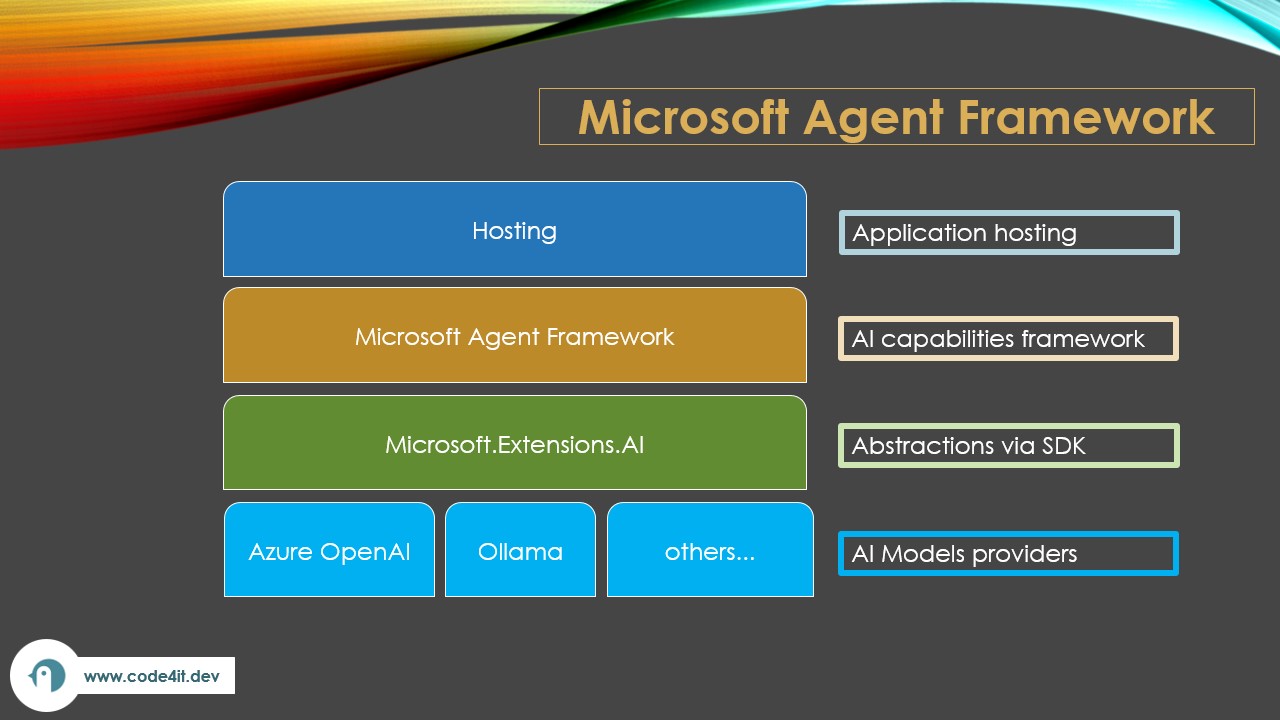
Layer 1: Model providers and AI backends
At the bottom you have the actual AI services like Azure AI Foundry, Azure OpenAI, OpenAI, and other providers supported through provider-specific integrations.
This layer is about the model itself: prompts, responses, embeddings, tool calls, structured outputs, and so on.
You can choose whatever you want, depending on your needs. For example, given that using models often has a cost, you may decide to use a free provider for development and testing, and a paid provider for production.
Layer 2: Microsoft.Extensions.AI as an abstraction layer
On top of the raw providers, Microsoft is building reusable .NET abstractions through the Microsoft.Extensions.AI namespace.
This is a foundational layer that standardizes concepts such as:
- chat messages
- chat clients
- tool abstractions
- AI function metadata
- structured outputs
- common extension points
As you can imagine, this namespace contains most of the classes and interfaces that we are going to use through the rest of the series.
So, Microsoft Agent Framework is not a replacement for Microsoft.Extensions.AI, but, on the contrary, it is a higher-level framework that builds on top of it.
That is an important design choice:
Microsoft.Extensions.AIanswers “how do I talk to AI services in a consistent .NET-friendly way?”- Microsoft Agent Framework answers “how do I compose those capabilities into agents and workflows?”
Layer 3: Microsoft Agent Framework
This is the layer where you define agents, attach tools, manage sessions, and orchestrate collaboration.
For our board game application, this is where we would model things like the Catalog Agent that knows how to search the game catalog, the Recommendation Agent that suggests games based on player preferences and, more importantly, an orchestration flow that decides when those agents should cooperate.
Layer 4: Hosting, durability, and interoperability
Above the core agent model, MAF also includes packages and patterns for hosting agents in real applications, OpenTelemetry-style observability, and interoperability protocols such as MCP and A2A.
That is the part that makes MAF feel closer to an application platform than to a simple SDK.
Core concepts in Microsoft Agent Framework
Let me break down the core concepts without making them sound more mysterious than they actually are.
Agents
An Agent is the component that receives input, reasons about it through an AI model, and decides what to do next.
In practice, an agent usually has:
- a name
- a set of instructions
- a model/client underneath
- a set of tools (we will see that in the next section)
- optional state and orchestration behavior
For example, in our board game app, a “recommendation” agent might have instructions like:
Help users choose board games based on player count, play duration, complexity, and preferred mechanics. Prefer concise answers and explain trade-offs when recommending more than one game.
So the agent is not just “the model”. It is the model plus the behavioral contract you define around it.
Tools
Tools are how an agent interacts with real data, usually by calling external services or by accessing internal application logic.
In .NET terms, tools are often created from regular methods or functions. For example, our board game app could expose tools such as SearchBoardGames, GetGameDetails, and SummarizeRecentSessions.
Without tools, the agent can only answer from its model knowledge and the current prompt. With tools, it can do useful work against your actual application.
Sessions
Sessions represent the state of an interaction over time.
That sounds abstract, but the idea is actually very practical. A session is how your agent remembers that:
- the user already said they prefer cooperative games
- they own Terraforming Mars but not Ark Nova
- the previous message asked for recommendations for exactly 2 players
- a workflow is mid-execution and waiting for another step
Without sessions, every request is isolated, but with sessions, the application can support continuity.
Sessions are extremely important in real applications, because users do not interact with agentic systems by sending one perfect, self-contained prompt. They ask follow-up questions, correct themselves, change direction, and expect the system to keep up.
Orchestration and workflows
If an agent is one decision-making component, orchestration is the logic that coordinates several steps or several agents together.
That coordination may be sequential, parallel, based on approval, and so on.
The important point is that orchestration is one of the core functionalities of MAF. Current .NET guidance focuses on patterns such as sequential execution, concurrent execution, handoff, and group collaboration. Some newer patterns are still evolving across runtimes, so it is better to think in terms of “supported workflow families” than “every pattern is identical everywhere”.
For example, a board game recommendation flow might work like this:
- the entry agent understands the request,
- it calls a catalog tool,
- it delegates to a recommendation agent,
- it asks a pricing tool for current availability,
- it returns a ranked answer,
- optionally, it saves the result to the user’s wishlist.
Could you implement that without MAF? Absolutely.
But MAF gives you a framework where these patterns are already supported, and you don’t need to reinvent the wheel.
The role of Microsoft.Extensions.AI
This is worth repeating because it is one of the most important architectural ideas in the whole stack.
Microsoft.Extensions.AI is the foundational abstraction layer that lets different AI providers and AI-related concepts look consistent inside a .NET application.
That gives MAF a few advantages:
- Provider flexibility: if your board game assistant starts on Azure AI Foundry and later needs to support another provider, the application architecture does not need to be redesigned from scratch.
- Familiar .NET composition: Developers can work with AI capabilities using patterns that feel aligned with the rest of the .NET ecosystem instead of learning a completely separate mental model for everything.
- Cleaner tool integration: Since tool metadata and chat abstractions are already normalized, MAF can focus on higher-level agent behavior instead of rebuilding lower-level primitives.
Microsoft Agent Framework vs Semantic Kernel vs LangChain vs AutoGen
This is probably the section most people care about, so let’s go straight to the point.
- Choose Microsoft Agent Framework when you are building a real .NET agent application and want a framework explicitly aimed at production orchestration.
- Choose Semantic Kernel if you are working with an existing SK codebase, plugins, or prompt-centric orchestration and you are not ready to move yet.
- Choose LangChain when your team primarily lives in the Python/JavaScript ecosystem and wants that ecosystem’s integrations and patterns.
- Choose AutoGen when you are experimenting with agent-to-agent conversational patterns and research-oriented multi-agent interactions, especially outside a strongly .NET-centric architecture.
So should we drop Semantic Kernel?
The current Microsoft guidance is trending toward Microsoft Agent Framework as the preferred framework for new, production-oriented agent workflows (see the migration guides in the Further readings section).
That does not mean Semantic Kernel is obsolete. If you already have a working Semantic Kernel application, you can keep using it; just evaluate MAF first for new architecture decisions.
So, if your application is using Semantic Kernel, don’t panic and rewrite everything tomorrow morning. Just remember that, for future systems, MAF should probably be one of the frameworks to consider.
When should you choose Microsoft Agent Framework?
Personally, I would consider MAF first when:
- your application is primarily based on .NET
- you need more than a single chat completion call
- tools are going to interact with real business systems
- you expect stateful conversations
- you may need multiple agents
- production concerns such as tracing, hosting, and orchestration already matter
That describes a lot of internal enterprise apps, copilots, automation systems, support assistants, and domain-specific AI workflows.
But still… not every app needs MAF!
I would avoid it (or at least postpone its adoption) when:
- you only need a single prompt + response** integration
- the system has no tool usage and no session continuity
- you are still validating whether the feature should exist at all
- your team is entirely centered on another ecosystem where a different framework is already the natural fit
In those cases, starting with plain Microsoft.Extensions.AI, a direct provider SDK, or even a smaller prototype may be the smarter move.
This is an important point because “agent framework” sounds cool, but unnecessary orchestration is still unnecessary orchestration.
Further readings
If you want to continue exploring Microsoft Agent Framework, these are the first resources I suggest:
🔗 Microsoft Agent Framework overview | Microsoft Learn
🔗 Microsoft Agent Framework quickstart | Microsoft Learn
🔗 Migration guide from Semantic Kernel | Microsoft Learn
🔗 Migration guide from AutoGen | Microsoft Learn
🔗 microsoft/agent-framework on GitHub
This article first appeared on Code4IT 🐧
In the next article of this series, we will move from theory to code and start building the first version of our board game assistant. So stay tuned 👀👀
Wrapping up
Microsoft Agent Framework is Microsoft’s current answer to a very specific problem: how do we build agent-based applications that feel like real software systems, not just prompt demos?
In this article, we have seen what MAF is, how it fits into the Microsoft AI ecosystem, and when it is a better fit than alternatives like Semantic Kernel, LangChain, and AutoGen.
If I had to summarize the entire article in one practical rule, I would say:
- use provider SDKs when you only need model access,
- use
Microsoft.Extensions.AIwhen you want a clean .NET abstraction layer, - use Microsoft Agent Framework when you are building an agentic application, not just calling a model.
But that is just the beginning! Starting with the next article of this series we will get our hands dirty with code, tools, and sessions around the board game application.
I hope you enjoyed this article! Let's keep in touch on LinkedIn, Twitter or BlueSky! 🤜🤛
Happy coding!
🐧