

No more regressions with Snapshot Tests in C# using Verify: a practical guide
Snapshot Tests are an uncommon type of test that focuses on checking that no regressions were introduced after a code refactoring. Let’s learn how they work and how to use the Verify NuGet library to add them to your test suite.
Table of Contents
Just a second! 🫷
If you are here, it means that you are a software developer. So, you know that storage, networking, and domain management have a cost .
If you want to support this blog, please ensure that you have disabled the adblocker for this site. I configured Google AdSense to show as few ADS as possible - I don't want to bother you with lots of ads, but I still need to add some to pay for the resources for my site.
Thank you for your understanding.
- Davide
When you think about automated tests, you probably think of Unit Tests and Integration Tests. And yeah, those are the most common kinds of tests you’ll write in your day-to-day work.
But there is another kind of test that, while less common, can be extremely valuable in certain situations: Snapshot Tests.
In this article, we will learn what Snapshot Tests are, how they differ from the usual tests, and how to use the Verify NuGet library to add them to a C# project.
We will cover two practical examples: a method that returns data (so we can verify the serialization of the output) and a method that sends data to a remote endpoint (so we can ensure that the outgoing payload never changes unexpectedly).
The examples in this article are written using C# 12. However, the concepts and the Verify library are applicable to any C# version that supports .NET 6 or later.
What are Snapshot Tests?
Snapshot Tests work differently from the usual Arrange-Act-Assert flow you are used to.
Instead of asserting specific values, Snapshot Tests capture the entire output of a method and save it to a file: the so-called “snapshot”.
On the first run, the test generates a file with the baseline used for comparison in future runs.
On the next run, the test runs the exact same method with the exact same parameters, and compares the current output against the saved file. If they match, the test passes, because nothing has changed. If they don’t match, the test fails, and you will be shown the diff between the two versions.
Here is the key point: the first time you run a Snapshot Test, it will fail, for an obvious reason: there is nothing to compare against. The test framework will create the snapshot file, and you will have to review it and manually approve it. From that moment on, the test will pass every time the output matches the approved snapshot.
When you intentionally change the behavior of a method, the snapshot will no longer match. You will need to review the diff, understand what changed, and approve the new snapshot if the change is correct.
When are Snapshot Tests useful?
Think of Snapshot Tests as guards agains regressions: they ensure that the output of your methods does not change unexpectedly. And - needless to say it - this kind of test is more and more necessary now that we have AI tools that can refactor our codebase with no effort, but with the risk of unexpectedly changing the behavior.
In my experience, I used them to verify that a huge refactoring did not introduce any regressions.
Think of the case you need to refactor your database access because you are facing the N+1 problem: Unit tests would be pointless (if you have tests that mock db access and you’re testing that specific calls were executed, then you will have to throw away those tests and write new ones).
Integration Tests work, but they will only identify if the properties you have explicitly asserted have changed. If a new property is added to your model, and it starts returning garbage data, your Integration Test will still pass, because you never checked that property.
But Snapshot Tests will catch any unexpected change in the output of your methods, and they will do it automatically.
How Snapshot Tests differ from Unit Tests
In a typical Unit Test, you assert a specific property or value:
[Test]
public void GetUser_ShouldReturnCorrectName()
{
    var service = new UserService();
    var user = service.GetUser(1);
    Assert.That(user.Name, Is.EqualTo("Alice"));
}
This kind of test is fine, but it has a limitation: you only assert what you explicitly check. If a new field is added to the User object and it starts returning garbage data, your test will still pass, because you never checked that field.
Snapshot Tests solve this problem by capturing the entire output:
[Test]
public Task GetUser_ShouldMatchSnapshot()
{
    var service = new UserService();
    var user = service.GetUser(1);
    return Verify(user);
}
With this approach, if any field changes (whether you expected it or not) the test will fail. This makes Snapshot Tests especially valuable for:
- Ensuring that serialized responses never change unexpectedly
- Validating the exact shape of outgoing HTTP requests
- Detecting regressions in complex objects that would be tedious to assert property by property
This does not mean you should replace all Unit Tests with Snapshot Tests. They are complementary tools:
| Unit Tests | Snapshot Tests |
|---|---|
| Assert specific values | Assert the entire output |
| Easy to understand intent | Easy to detect unexpected changes |
| Fail only when asserted value changes | Fail whenever any part of the output changes |
| No external files needed | Require snapshot files to be committed |
| The goal is to verify correctness | The goal is to detect unexpected changes |
Verify: a NuGet package for Snapshot Testing
Verify is an open-source NuGet library created by Simon Cropp. It integrates with all the major C# test frameworks: NUnit, xUnit, and MSTest.
The library works by serializing the object you pass to Verify(...) to a file (usually JSON or text) and comparing it with the previously approved version.
The full source code and documentation are available on GitHub:
The package you install depends on the test framework you are using. For NUnit you can just run the following command in your test project:
dotnet add package Verify.NUnit
Similar versions exist for xUnit and MSTest as well.
How to work with Snapshot files
When you run a Snapshot Test for the first time, Verify creates two files side by side with your test file:
MyTest.TheMethodName.received.txt: the output of the current runMyTest.TheMethodName.verified.txt: the approved snapshot (initially empty)
The test will fail on the first run. You need to review the .received file and, if the output is correct, copy it to the .verified file (or rename the .received file as .verified).
Always commit the .verified files to source control, as they are the source of truth for your tests. On the other hand, the .received files are generated at every test run, and should be added to .gitignore.
How to create Snapshot Tests on methods that return data
Let’s start with a simple example: a method that builds and returns the details of a board game (have I ever mentioned that I LOVE board games?? 😇).
Here is the production code:
public class BoardGame
{
    public int Id { get; set; }
    public string Name { get; set; } = string.Empty;
    public int PublicationYear { get; set; }
    public int MinPlayers { get; set; }
    public int MaxPlayers { get; set; }
    public int AvgScore { get; set; }
}

public class BoardGamesService
{
    private readonly List<BoardGame> _boardGames =
    [
        new BoardGame
        {
            Id = 1,
            Name = "Catan",
            PublicationYear = 1995,
            MinPlayers = 3,
            MaxPlayers = 4,
            AvgScore = 7
        },
        new BoardGame
        {
            Id = 2,
            Name = "Ticket to Ride",
            PublicationYear = 2004,
            MinPlayers = 2,
            MaxPlayers = 5,
            AvgScore = 8
        },
        new BoardGame
        {
            Id = 3,
            Name = "Pandemic",
            PublicationYear = 2008,
            MinPlayers = 2,
            MaxPlayers = 4,
            AvgScore = 8
        }
    ];


    public BoardGame? GetById(int id)
    {
        foreach (var boardGame in _boardGames)
        {
            if (boardGame.Id == id)
            {
                return boardGame;
            }
        }

        return null;
    }
Our first Snapshot Test run
Here is the Snapshot Test that executes the GetById method and verifies the output:
[TestFixture]
public class BoardGamesServiceTests
{
    [Test]
    public Task GetById_ShouldMatchSnapshot()
    {
        var service = new BoardGamesService();

        var boardGame = service.GetById(1);
        return Verify(boardGame);
    }
}
The first time you run this test, it fails and creates the .received.txt file with a JSON-like content, and an empty .verified.txt file.
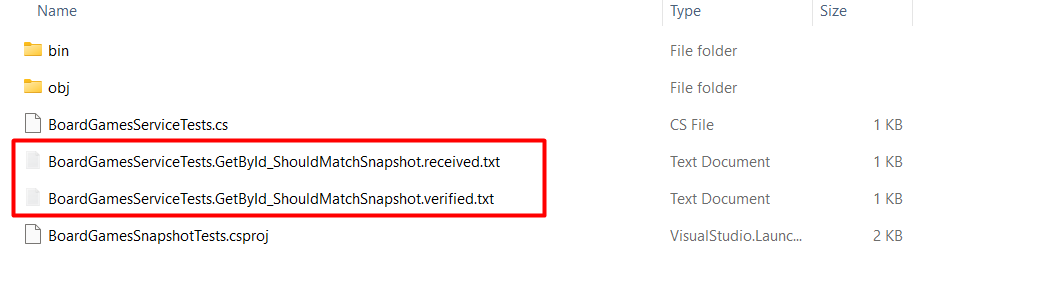
It usually opens the file in your diff editor. Mine is Visual Studio Code, and this is the result I see:

When everything is OK, and you have reviewed the .received file, you will need to approve it by renaming it to .verified.txt to promote it as the “real source of truth”.
As I mentioned, the content is not a pure JSON: you can notice it by the fact that the property names and strings are not quoted. This is because Verify uses a custom serialization format that is more human-readable than JSON, but still structured enough to be compared easily.
{
  Id: 1,
  Name: Catan,
  PublicationYear: 1995,
  MinPlayers: 3,
  MaxPlayers: 4,
  AvgScore: 7
}
Once you review it and approve it, the test will pass on every subsequent run - as long as the output stays the same. You can verify it by running the test again, and you will see that it passes.
Now you can refactor the whole BoardGamesService class (for example, converting the _boardGames list to a Dictionary<int, BoardGame>), and, as long as the output of GetById does not change, the test will pass. This is a great way to ensure that your refactoring does not introduce regressions.
Intercepting unexpected changes with Snapshot Tests
Imagine that a colleague adds a new field, Category, to BoardGame with a default value:
public class BoardGame
{
    public int Id { get; set; }
    public string Name { get; set; } = string.Empty;
    public int PublicationYear { get; set; }
    public int MinPlayers { get; set; }
    public int MaxPlayers { get; set; }
    public int AvgScore { get; set; }
    public string Category { get; set; } = "Fun";
}
The snapshot test will immediately fail, showing you a diff like:
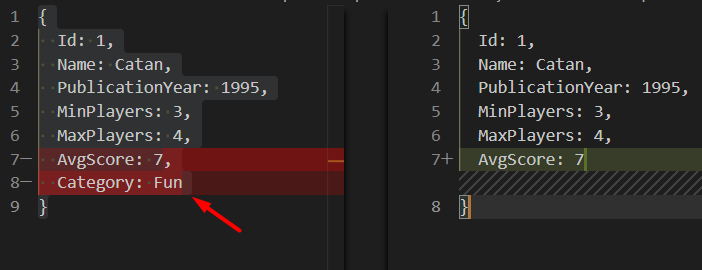
With a classic Unit Test that only asserts the Name field, this addition would have gone completely unnoticed.
How to handle dynamic values in Snapshot Tests by Scrubbing them
One problem you will encounter quickly is with dynamic values, like timestamps, GUIDs, and random numbers that change on every run.
For example, let’s add a LastPlayedAt property to BoardGame that is set to the current date and time whenever the game is played:
public class BoardGame
{
    public int Id { get; set; }
    public string Name { get; set; } = string.Empty;
    public int PublicationYear { get; set; }
    public int MinPlayers { get; set; }
    public int MaxPlayers { get; set; }
    public int AvgScore { get; set; }
    public string Category { get; set; } = "Fun";
    public DateTime LastPlayedAt { get; set; } = DateTime.UtcNow;
}
Verify provides automatic scrubbing to handle this kind of data: in fact, DateTime values are automatically scrubbed by default, and the result content uses a placeholder.
{
  Id: 1,
  Name: Catan,
  PublicationYear: 1995,
  MinPlayers: 3,
  MaxPlayers: 4,
  AvgScore: 7,
  Category: Fun,
  LastPlayedAt: DateTime_1
}
This works well for DateTime values. But what if you stored that date as a string in a specific format? Or what if you had a GUID that changes on every run?
public class BoardGame
{
    public int Id { get; set; }
    public string Name { get; set; } = string.Empty;
    public int PublicationYear { get; set; }
    public int MinPlayers { get; set; }
    public int MaxPlayers { get; set; }
    public int AvgScore { get; set; }
    public string Category { get; set; } = "Fun";
    public DateTime LastPlayedAt { get; set; } = DateTime.UtcNow;

    public string LastPlayedAsString { get => LastPlayedAt.ToString(); }
}
In this case, the LastPlayedAsString property will change on every run, and the snapshot test will fail.
{
  Id: 1,
  Name: Catan,
  PublicationYear: 1995,
  MinPlayers: 3,
  MaxPlayers: 4,
  AvgScore: 7,
  Category: Fun,
  LastPlayedAt: DateTime_1,
  LastPlayedAsString: 24/06/2026 19:07:34
}
This is when you can use the ScrubMember method to specify which members to scrub:
[Test]
public Task GetById_ShouldMatchSnapshot_WithScrubbedData()
{
    var service = new BoardGamesService();

    var boardGame = service.GetById(1);
    return Verify(boardGame).
        ScrubMember<BoardGame>(p => p.LastPlayedAsString);
}
When a member is scrubbed, Verify replaces its value with a placeholder in the snapshot:
{
  Id: 1,
  Name: Catan,
  PublicationYear: 1995,
  MinPlayers: 3,
  MaxPlayers: 4,
  AvgScore: 7,
  Category: Fun,
  LastPlayedAt: DateTime_1,
  LastPlayedAsString: {Scrubbed}
}
This way, the test always passes regardless of the exact date, while still asserting that the field is present and of the correct type.
How to create Snapshot Tests on a method that sends data to a remote endpoint, to verify the outgoing payload
Now let’s look at a more interesting scenario: a method that sends an HTTP request to a remote endpoint.
The challenge here is that we want to verify the exact payload that is being sent, without actually calling a real server.
Here is the production code:
public class BoardGamesSender(HttpClient httpClient)
{
    private readonly HttpClient _httpClient = httpClient;
    public const string DefaultApiEndpoint = "https://api.example.com/boardgames";

    public async Task<SendBoardGameResult> SendToApiAsync(
       BoardGame boardGame,
       CancellationToken cancellationToken = default)
    {
        var dto = new BoardGameDto(boardGame.Id, boardGame.Name);

        var requestBody = JsonSerializer.Serialize(dto);
        using var content = new StringContent(requestBody, System.Text.Encoding.UTF8, "application/json");
        using var response = await _httpClient.PostAsync(DefaultApiEndpoint, content, cancellationToken);

        return new SendBoardGameResult(
            (int)response.StatusCode,
            requestBody,
            await response.Content.ReadAsStringAsync(cancellationToken));
    }

    public record BoardGameDto(int GameId, string Name);
    public record SendBoardGameResult(int StatusCode, string RequestBody, string ResponseBody);
}
As you can see, we are using an HttpClient, and we are converting the input BoardGame object to a DTO, which is then serialized to JSON and sent to the remote endpoint.
We are interested in verifying that the JSON payload is correct, and that it does not change unexpectedly.
To test this without hitting a real server, we can use a custom HttpMessageHandler that intercepts the HTTP request:
public class CapturingHttpMessageHandler : HttpMessageHandler
{
    public HttpRequestMessage? CapturedRequest { get; private set; }
    public string? CapturedBody { get; private set; }

    protected override async Task<HttpResponseMessage> SendAsync(
        HttpRequestMessage request,
        CancellationToken cancellationToken)
    {
        CapturedRequest = request;
        CapturedBody = await request.Content!.ReadAsStringAsync(cancellationToken);

        return new HttpResponseMessage(HttpStatusCode.OK);
    }
}
Then we are going to use this custom MessageHandler in our Snapshot Test:
[Test]
public async Task SendToApiAsync_Snapshot()
{
    var handler = new CapturingHttpMessageHandler();
    var httpClient = new HttpClient(handler);
    var service = new BoardGamesSender(httpClient);

    var dto = new BoardGame
    {
        Id = 3,
        Name = "Pandemic",
        PublicationYear = 2008,
        MinPlayers = 2,
        MaxPlayers = 4,
        AvgScore = 8
    };

    await service.SendToApiAsync(dto);

    // Assert - verify the captured request body
    await VerifyJson(handler.CapturedBody);
}
Interestingly, we can use the VerifyJson method to automatically format the JSON payload and make it more readable in the snapshot file.
On the first run, Verify creates the snapshot file with the exact JSON payload that was sent:
{
  "GameId": 3,
  "Name": "Pandemic"
}
Now suppose that someone renames GameId to Id in the BoardGameDto class - maybe to align with a new naming convention. The JSON serialization will change accordingly:
  {
-   "GameId": 3,
+   "Id": 3,
    "Name": "Pandemic"
  }
The snapshot test will immediately catch this and fail. This is crucial: if the remote API is expecting a field called GameId, renaming it without updating the API contract would cause a silent bug in production. The Snapshot Test acts as a safeguard.
Verifying the full request, not just the body
You can also verify additional details about the request: the HTTP method, the URL, and the headers:
[Test]
public async Task SendToApiAsync_Snapshot_FullRequest()
{
    var handler = new CapturingHttpMessageHandler();
    var httpClient = new HttpClient(handler);
    var service = new BoardGamesSender(httpClient);

    var dto = new BoardGame
    {
        Id = 3,
        Name = "Pandemic",
        PublicationYear = 2008,
        MinPlayers = 2,
        MaxPlayers = 4,
        AvgScore = 8
    };

    await service.SendToApiAsync(dto);

    var requestSnapshot = new
    {
        Method = handler.CapturedRequest!.Method.Method,
        Url = handler.CapturedRequest.RequestUri!.ToString(),
        Body = handler.CapturedBody

    };

    // Assert - verify the captured request body
    await Verify(requestSnapshot);
}
The resulting snapshot would look like this:
{
  Method: POST,
  Url: https://api.example.com/boardgames,
  Body: {"GameId":3,"Name":"Pandemic"}
}
Any accidental change to the URL, the HTTP method, or the request body will now be caught immediately.
The full workflow for working with Verify and Snapshot Tests
Let me describe the typical workflow when working with Verify:
- Write the test and run it for the first time. It will fail and generate the
.receivedfile. - Review the
.receivedfile. Is the output correct? Does it represent the expected behavior? - Approve the snapshot by copying the
.receivedfile over the.verifiedfile. - Commit the
.verifiedfile to source control, and add the.receivedfile to.gitignore. - On subsequent runs, the test will pass as long as the output matches the approved snapshot.
- When the output changes (intentionally), review the diff, and if everything is correct, approve the new snapshot.
Verify also provides tooling to simplify step 3. For example, you can use the dotnet verify accept CLI tool.
Further readings
Verify is a rich library with many more features than what we covered here. For example, you can verify the content of files, HTML, and everything that can be serialized.
As we saw, when we talk about “testing” we do not talk only of “Unit Tests” with Mocks, Stubs and so on: there’s a whole universe to explore.
Here’s an article that you might find interesting:
🔗 4 ways to create Unit Tests without Interfaces in C# | Code4IT
Unit tests are not enough. Maybe for your needs it’s better to write an Integration Test. But how can you customize its dependencies?
🔗 Advanced Integration Tests for .NET 7 API with WebApplicationFactory and NUnit | Code4IT
Now that you know that Unit Tests are not enough, that Integration Tests exist, and that other types of tests exist as well, you might want to know how to organize them in a way that makes sense.
Maybe you should follow the Testing Pyramid? Or maybe the Testing Diamond?
🔗 Testing Pyramid vs Testing Diamond (and how they affect Code Coverage) | Code4IT
And if neither of them is enough, maybe you should consider the Testing Vial!
This article first appeared on Code4IT 🐧
There is one last thing to consider: starting from September 2026, the license fee will change for commercial use.

Wrapping up
In this article, we learned about Snapshot Tests and how they complement the Unit Tests and Integration Tests you already write.
We saw how Verify makes it straightforward to add Snapshot Tests to a C# project: you simply call Verify(...) on any object, and the library handles serialization, file management, and comparison for you.
We covered two practical scenarios:
- A method that returns data: Snapshot Tests ensure that the entire shape of the returned object does not change unexpectedly, catching regressions that classic assertion-based tests would miss.
- A method that sends data to a remote endpoint: Snapshot Tests ensure that the outgoing payload never changes silently, protecting you from API contract breaks that could cause production bugs.
The key thing to remember is that Snapshot Tests are not a replacement for Unit Tests: they are a complementary tool. Use them wherever you need to guard against unexpected changes to complex outputs or external payloads.
I hope you enjoyed this article! Let's keep in touch on LinkedIn, Twitter or BlueSky! 🤜🤛
Happy coding!
🐧
