

Python for .NET devs: data types, classes, objects, records and interfaces
A quick comparison of data types, classes, objects, records, and interfaces in C# and Python, designed for .NET developers learning Python.
Table of Contents
Just a second! 🫷
If you are here, it means that you are a software developer. So, you know that storage, networking, and domain management have a cost .
If you want to support this blog, please ensure that you have disabled the adblocker for this site. I configured Google AdSense to show as few ADS as possible - I don't want to bother you with lots of ads, but I still need to add some to pay for the resources for my site.
Thank you for your understanding.
- Davide
If you come from C# and start learning Python (like I’m doing right now), you might be wondering: where are classes, records, interfaces, and types? Do they exist in Python? Are they the same as in C#?
Good news: all those concepts exist in Python too, but they are modeled differently.
In this article, we will compare them side by side so you can reuse your .NET mental model to write object-oriented Python code that behaves like C#. We will see the different ways to create objects, the differences in syntax and semantics, and a way that Python uses to define interfaces that is quite different from C#.
But clearly, we will start with the basics: data types.
Data types: familiar names, different type system defaults
In C#, the compiler enforces declared types:
int age = 30;
string name = "Davide";
// age = "thirty"; // compile-time error
In Python, values still have types, but variable names are not bound to one static type:
age = 30
name = "Davide"
age = "thirty"  # valid at runtime
print(f"My name is {name} and I am {age} years old.")
That flexibility is useful, but if you are used to typed languages like C#, you might want to add type hints:
def get_total(items: list[float]) -> float:
    return sum(items)
These hints will give tools like VSCode the ability to provide autocompletion and type checking, even if they are not enforced at runtime.
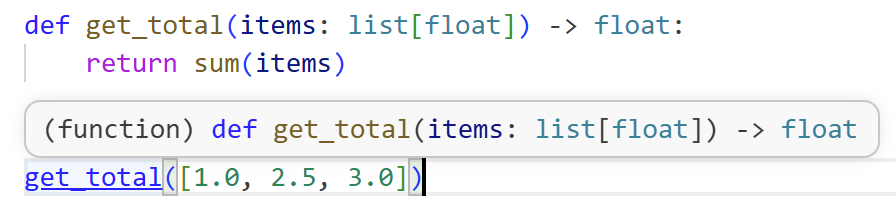
As you noticed, variables are dynamically typed; however, we still have data types, and they have familiar names: int, str, bool, float, list, dict, set, and tuple.
How do they map to C# types? Here is a quick recap table:
| C# type | Python type | Notes |
|---|---|---|
int |
int |
C# int is a 32-bit signed integer with a fixed range (-2,147,483,648 to 2,147,483,647), while Python int is indeed arbitrary-precision. For arbitrary-precision integers in C#, you would use System.Numerics.BigInteger. |
string |
str |
Both are immutable sequences of characters. |
bool |
bool |
Both represent true/false values. |
double |
float |
Both are double-precision floating-point numbers. |
List<T> |
list |
Both are mutable ordered collections. |
Dictionary<TKey, TValue> |
dict |
Both are mutable key-value mappings. |
HashSet<T> |
set |
Both are mutable collections of unique items. |
Tuple<T1, T2, ...> |
tuple |
Both are immutable ordered collections. |
Now that we know the basic data types, we can move to more advanced topics.
Nullability comparison
In C#, nullability is explicit with nullable reference types:
string? middleName = null;
In Python, the equivalent is usually None, and type hints can express optional values:
from typing import Optional

middle_name: Optional[str] = None
If you use Python 3.10+, you can also write str | None.
second_name: str | None = None
Classes and objects: similar, but with different syntax and semantics
Even if the syntax is quite different, the core concepts of classes and objects are very similar.
You still use the class keyword to define a class, and you define a constructor to initialize instance variables. You can also define methods that operate on the instance.
Let’s compare a simple class in C# and Python:
public class User
{
    public string Name { get; }

    public User(string name)
    {
        Name = name;
    }

    public string Greet() => $"Hello {Name}";
}
Here’s the equivalent in Python:
class User:
    def __init__(self, name: str):
        self.name = name

    def greet(self) -> str:
        return f"Hello {self.name}"
There are two main differences to note: the self keyword is explicit in Python instance methods, and the constructor is defined with __init__ instead of a method named after the class.
Ok, but how do we initialize an object in Python? Here’s how we create an instance of the User class and call its method:
user = User("Davide")
print(user.greet())  # Output: Hello Davide
What may feel different is that Python does not have a separate new keyword. You just call the class as if it were a function, and it returns an instance.
Records in C# vs dataclasses in Python
In C#, records are generally used for data-centric models.
You have to use the record keyword, and you can define positional records for a concise syntax:
public record Product(string Name, int Price);
In Python, the closest standard tool is dataclass:
from dataclasses import dataclass

@dataclass(frozen=True)
class Product:
    name: str
    price: int
A dataclass is similar to a C# record in that it reduces boilerplate for data-centric classes. It automatically generates methods like __init__, __repr__, and __eq__ based on the class attributes:
from dataclasses import dataclass

@dataclass(frozen=True)
class Product:
    name: str
    price: int

product = Product("Laptop", 999)
product2 = Product("Laptop", 999)

print(product == product2)  # This will print True because the dataclass provides an equality method based on the fields
If you declare the dataclass with frozen=True, it gives immutability-like behavior (similar intent to immutable records):
from dataclasses import dataclass
@dataclass(frozen=True)
class Product:
    name: str
    price: int
product = Product("Laptop", 999)
# product.price = 101  # This will raise a FrozenInstanceError because the dataclass is frozen (immutable)
Interfaces and abstract classes: from explicit contracts to structural typing
C# uses explicit interfaces, which expose only the method signatures without implementation:
public interface INotifier
{
    void Send(string message);
}

public class EmailNotifier : INotifier
{
    public void Send(string message)
    {
        Console.WriteLine($"Email: {message}");
    }
}
Python has two common approaches.
Abstract Base Classes (explicit inheritance)
from abc import ABC, abstractmethod

class Notifier(ABC):
    @abstractmethod
    def send(self, message: str) -> None:
        pass

class EmailNotifier(Notifier):
    def send(self, message: str) -> None:
        print(f"Email: {message}")
This approach is closer to the C# interface mindset: explicit base type plus mandatory implementation. We can say that this approach is actually more similar to C# abstract classes, because it can also contain implemented methods. However, it is the closes thing that we have to C# interfaces, because it enforces a contract through inheritance.
Let’s see how it works in practice:
from abc import ABC, abstractmethod

class Notifier(ABC):
    @abstractmethod
    def send(self, message: str) -> None:
        pass

    def notify_multiple(self, message: str, times: int) -> None:
        for _ in range(times):
            self.send(message)

class EmailNotifier(Notifier):
    def send(self, message: str) -> None:
        print(f"Email: {message}")

notifier = EmailNotifier()
notifier.send("This is a notification message.")
notifier.notify_multiple("This is a repeated notification message.", 3) # this one comes from the base class and works because EmailNotifier implements send()
Notice that the Notifier base class implements a notify_multiple method. So, yes, we can say that Python’s ABC is more similar to C# abstract classes than to interfaces, because it can contain both abstract methods (like send) and concrete methods (like notify_multiple).
Protocols (structural typing)
Another approach (which is actually something that I, as .NET developer, am not used to) is to use Protocol from the typing module. This allows for structural typing, meaning that if a class has the right methods, it can be considered a subtype without explicitly inheriting from a base class.
from typing import Protocol

class Notifier(Protocol):
    def send(self, message: str) -> None:
        ...

class EmailNotifier:
    def send(self, message: str) -> None:
        print(f"Email: {message}")
EmailNotifier does not need to inherit from Notifier. If it has the right shape, static type checkers accept it. This is often called static duck typing (because of the “if it looks like a duck and quacks like a duck, it’s a duck” principle).
from typing import Protocol

class Notifier(Protocol):
    def send(self, message: str) -> None:
        ...

class EmailNotifier:
    def send(self, message: str) -> None:
        print(f"Email: {message}")

def notify_multiple(notifier: Notifier, message: str, times: int) -> None:
    for _ in range(times):
        notifier.send(message)

notifier = EmailNotifier()
notifier.send("This is a notification message.")

notify_multiple(notifier, "This is a repeated notification message.", 2)
When to use what?
As we saw, Python offers multiple ways to model similar concepts. Here are some guidelines:
- Use a regular class when behavior is more important than raw data: methods, inheritance, and encapsulation are the focus.
- Use
@dataclasswhen data is the main concern: it reduces boilerplate and provides value semantics. - Use
ABCwhen you want explicit inheritance-based contracts: it’s clear and enforced at runtime. - Use
Protocolwhen you prefer loose coupling and shape-based compatibility: it’s more flexible and works well with static type checkers. - Use type hints everywhere in non-trivial projects: they improve readability, maintainability, and tooling support.
Apart from that, we can say that Python is more flexible and less strict than C#, which can be a double-edged sword. It allows for more rapid development and experimentation, but it also requires discipline to maintain code quality and readability.
Common beginner mistakes when moving from C# to Python
It’s easy to fall into some traps when transitioning from a statically typed language like C# to a dynamically typed one like Python. Here are some common mistakes to watch out for:
- Expecting access modifiers to behave exactly like C#.
- Skipping type hints in larger modules, then losing refactoring safety.
- Overusing inheritance where composition is simpler.
- Ignoring immutability for value-like data objects.
- Treating
Protocolas runtime enforcement (it is mainly a static typing tool).
It’s important to embrace Python’s idioms and flexibility while applying the best practices that you already know from C#. With time, you’ll find the right balance between Pythonic style and your .NET mental model.
Further readings
If you want to go deeper, start with the official documentation:
🔗 Classes in Python | Python Docs
🔗 typing.Protocol | Python Docs
And, of course, the C# documentation for the concepts we covered:
🔗 C# records | Microsoft Learn
🔗 Interfaces in C# | Microsoft Learn
Then, the best approach (as always!) is to write code and experiment with these concepts in practice. Try to implement a small project or solve some coding challenges using classes, dataclasses, and protocols to get a feel for how they work in Python.
This article first appeared on Code4IT 🐧
Also, you can find the other articles of this series here:
- Python for .NET devs: Introduction, virtual environments, package management, and execution lifecycle
- Python for .NET devs: data types, classes, objects, records and interfaces
Wrapping up
In this article we mapped classes, objects, records, interfaces, and core data type differences between C# and Python.
If you are a .NET developer learning Python, just remember that:
- Python is dynamically typed by default, but type hints recover a lot of clarity and safety.
- Interface-style design can be nominal (
ABC) or structural (Protocol).
Then, don’t forget that Python instance methods require explicit self, and that to initialize an object you don’t need the new keyword: just call the class as if it were a function.
I hope you enjoyed this article! Let's keep in touch on LinkedIn, Twitter or BlueSky! 🤜🤛
Happy coding!
🐧