
Microsoft Agent Framework for .NET (part 4): static methods, instance methods, MCP Clients as custom Agent tools
MAF Agents can have custom capabilities through C# methods or MCP clients. Let’s see how to define and use them.
Table of Contents
Just a second! 🫷
If you are here, it means that you are a software developer. So, you know that storage, networking, and domain management have a cost .
If you want to support this blog, please ensure that you have disabled the adblocker for this site. I configured Google AdSense to show as few ADS as possible - I don't want to bother you with lots of ads, but I still need to add some to pay for the resources for my site.
Thank you for your understanding.
- Davide
In this fourth article in the Microsoft Agent Framework for .NET (MAF) series, we’ll learn how to create custom tools.
We’ll start by learning how to define both static and instance methods as custom tools and make them accessible to an agent.
Finally, we’ll explore how to use MCP connectors as custom tools, enabling the agent to interact with external systems and services.
As mentioned, this article is part of the series on AI capabilities with the Microsoft Agent Framework. Here are the other articles in the series:
- Microsoft Agent Framework for .NET (part 1): what it is, how it works, and when to use it
- Microsoft Agent Framework for .NET (part 2): How to use IChatClient with Azure Foundry and Ollama in .NET
- Microsoft Agent Framework for .NET (part 3): Custom Agents, for building a chat with custom instructions
- Microsoft Agent Framework for .NET (part 4): static methods, instance methods, MCP Clients as custom Agent tools
Custom tools in Microsoft Agent Framework for .NET
An agent can perform many operations autonomously. But when it comes to specific tasks, such as querying a database for particular data or calling methods in your application, it can be difficult to handle.
Even if you give an agent detailed instructions and write the best prompt ever, it may still hallucinate.
Another important area to consider is security and control. You need to ensure that the agent can perform only safe, authorized actions. You don’t want to give an agent permission to do anything it wants on your system, right?
That’s where tools come in: a tool is a specific capability that an agent can invoke to perform an operation. Tools encapsulate the logic and permissions required for these operations, allowing the agent to use them safely and effectively.
Interestingly, agents can use only registered tools. They shouldn’t be able to do “absolutely everything,” but they can perform any operation that you’ve explicitly registered. This means that when you define an agent, you also need to consider its scope of action: the more specialized an agent is, the more effective and reliable it will be.
How to define C# methods as custom Agent tools
A custom tool is nothing but a method enriched with metadata that describes the tool and its parameters, making it discoverable and callable by the agent.
The description is added by using the DescriptionAttribute from the System.ComponentModel namespace.
Let’s define a simple custom tool that determines whether a board game supports a given number of players.
public static class BoardGameHelper
{
    [Description("Checks if a board game is suitable for a given number of players.")]
    public static bool IsSuitableForPlayers(
        [Description("The board game to check")] BoardGame game,
        [Description("The number of players")] int playerCount)
    {
        Console.WriteLine(">> Is it suitable?? <<");

        return playerCount >= game.MinPlayers && playerCount <= game.MaxPlayers;
    }
}
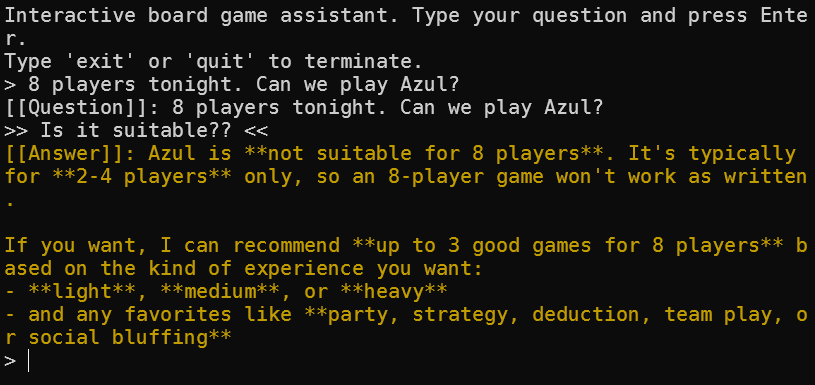
If we run it, we can see that in the console output the message in the Console.WriteLine statement is printed, indicating that the method was invoked.
Remember that neither the class nor the method can be private. They need to be accessible to the agent, so you must declare them as public or internal, depending on your accessibility requirements.
What about instance methods?
To invoke an instance method, the agent needs an instance of its class. An interface is not enough: you really need a concrete instance of the object.
Here’s an example:
internal class GamesCollectionRepository
{
    private HashSet<BoardGame> _games = new HashSet<BoardGame>();

    public GamesCollectionRepository()
    {
        Console.WriteLine(">> ctor of GamesCollectionRepository <<");
    }

    [Description("Adds a new game to the collection.")]
    public void AddGame([Description("The game to add")] BoardGame game)
    {
        Console.WriteLine($">> Adding game: {game.Title} <<");
        _games.Add(game);
    }


    [Description("Searches for games by category.")]
    public IEnumerable<BoardGame> SearchByCategory([Description("The category to search for")] string category)
    {
        Console.WriteLine($">> Searching for games in category: {category} <<");
        foreach (var game in _games)
        {
            if (game.Category.Contains(category, StringComparison.OrdinalIgnoreCase))
            {
                yield return game;
            }
        }
    }
}
This class can be used as a custom tool by the agent. It maintains an in-memory collection of board games and provides methods to add games and search for them by category. The methods are decorated with a Description attribute, making them discoverable and callable by the agent.
How to register static and instance methods as Agent tools
An agent shouldn’t be able to call tools without oversight. You need to explicitly register the tools it can use.
Registering a static method is easy: you just need to provide the method to the agent during registration.
For example, to register the BoardGameHelper.IsSuitableForPlayers method, I can write:
List<AITool> tools = new List<AITool> {
    AIFunctionFactory.Create(BoardGameHelper.IsSuitableForPlayers,  "is_suitable_for_players", "verifies that a game is suitable for a given number of players" ),
};

ChatClientAgent agent = new ChatClientAgent(chatClient,
    instructions: """
    You are BoardGameAssistant, an expert in modern board games.
    Just do what I ask you to do. Don't try to be clever or creative. Just follow the instructions.
    """,
    name: "BoardGameAssistant",
    description: "An expert assistant for recommending modern board games.",
    tools: tools
    );
Notice that the tools property of ChatClientAgent is a list of AITool instances.
Things get a bit more complex when you want to register instance methods as tools. You need to provide an instance of the class to AIFunctionFactory.Create so that the agent can call the method on that instance.
var instance = new GamesCollectionRepository();

List<AITool> tools = new List<AITool> {
    AIFunctionFactory.Create(instance.SearchByCategory, "search_by_category", "searches for games by category"),
    AIFunctionFactory.Create(instance.GetAllGames, "get_all_games", "retrieves all games in the collection"),
    AIFunctionFactory.Create(instance.AddGame, "add_game", "adds a new game to the collection")
};
Did you notice? Even though the tools already have descriptions, you can provide additional context or metadata when registering them. This can help the agent understand how to use the tools more effectively.
Can we declare interfaces as custom tools?
Short answer: not directly.
You can’t simply register methods from an interface and let the framework resolve the dependency. This makes sense: if there are multiple implementations of the same interface, which concrete instance should the agent call?
You need to get a concrete instance of the class. You can do this in one of the following ways:
- Manually create an instance of the class and register its methods as tools, as shown in the previous example.
- Use a dependency injection container to resolve the concrete instance, then register its methods as tools.
- Use a dependency injection container to resolve the concrete class’s dependencies, create an instance, and register its methods as tools.
- Use reflection to create an instance of the class dynamically, then register its methods as tools.
or you can use any other method that gives you a concrete instance of the class.
That said, interfaces are still useful for defining the architecture. You can define contracts such as IBoardGameCatalog, implement them in concrete classes such as BoardGameTools, and register the concrete methods as tools.
So: use interfaces for maintainability, use concrete methods for tool registration.
How to register MCP Clients as tools
We don’t have to rely solely on internal C# methods as tools for an agent. A simple method can access external APIs, interact with a database, or perform other familiar tasks.
Since MCP is now a thing, we can also use an MCP client as a tool, allowing the agent to interact with external services and systems beyond those accessible through local C# methods.
In this example, we will use the file system MCP server as a tool for our agent.
First, install the ModelContextProtocol NuGet package:
dotnet add package ModelContextProtocol
Then, initialize the McpClient as needed. In the example below, I initialize the MCP client to access the file system.
private static async Task<McpClient> InitializeFileSystemMcpClient()
{
    StdioClientTransport stdioClientTransport = new(new()
    {
        Name = "MCPServer",
        Command = "npx",
        Arguments = ["-y", "--verbose", "@modelcontextprotocol/server-filesystem", "C:\\Users\\BelloneDavide\\source\\repos"],
    });

    McpClient client = await McpClient.CreateAsync(stdioClientTransport);
    return client;
}
Notice that in the Arguments array for StdioClientTransport, I also specify the path to the folder the MCP server can access. The server won’t be able to access any other folders. This reinforces the point made earlier: an agent should have access only to the resources it needs.
Needless to say, you should only grant the MCP server access to folders that are necessary for your application, and avoid exposing sensitive or unrelated directories. You can use methods from the Path class to construct absolute paths to the folder you want. By the way, do you know the difference bewteen Path.Combine and Path.Join in C#?
We then use the McpClient.CreateAsync method to create an instance of the file system MCP client.
McpClient fileSystemMcpClient = await InitializeFileSystemMcpClient();

var mcpTools = await fileSystemMcpClient.ListToolsAsync();

ChatClientAgent agent = new ChatClientAgent(chatClient,
    instructions: """
    You are BoardGameAssistant, an expert in modern board games.
    Just do what I ask you to do. Don't try to be clever or creative. Just follow the instructions.
    """,
    name: "BoardGameAssistant",
    description: "An expert assistant for recommending modern board games.",
    tools: [.. tools, .. mcpTools]
    );
The easiest way to make MCP tools available to the agent is to use the McpClient.ListToolsAsync method, which retrieves all the tools available from the MCP server. You can then combine these with your local tools when initializing the agent.
You can find more information about setting up an MCP client for the file system in the following resources:
🔗 MCP Server File System | GitHub
I have a question for you: the StdioClientTransport class is Disposable, and you should dispose it to release any unmanaged resources it holds. How would you ensure that it is properly disposed in your code? Would you make the whole McpClient disposable as well, or would you use a using statement specifically for the transport?
AI is non deterministic, and so are the calls to your tools
Let’s look at this simple Screamer tool.
public static class Screamer
{
    [Description("Screams a text")]
    public static string Scream([Description("The text to scream")]string message)
    {
        Console.WriteLine("Screaming text: " + message);
        return message.ToUpperInvariant() + "!!!";
    }
}
How can we tell whether the tool was called during an interaction with the agent? One simple approach is to use Console.WriteLine.
This lets us see that the tool was called during an interaction, but it isn’t called for every interaction.
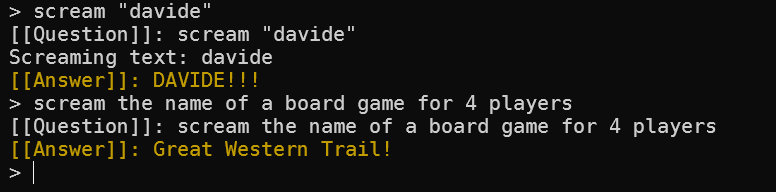
Notice the second response: the tool wasn’t called (as you can see from the lack of console output), so the message wasn’t screamed.
This is another example of how an agent’s behavior can vary and why it’s important to have mechanisms for verifying tool usage.
Also, consider the context: sometimes an agent may choose not to call a tool, even when it seems appropriate. Observable side effects, such as console output or logs, can help you understand the agent’s behavior.
Beware, not all models support Tools
It may not be obvious (it wasn’t to me at first) that not all AI models support tools.
For instance, some smaller or specialized models may not be able to invoke external tools, limiting their functionality compared with more capable models.
Have a look at what happened when I tried to use a tool with a model (phi3:mini) that doesn’t support it.

I wasn’t expecting that! So how can you ensure that the model you’re using supports the tools you intend to use?
Well, the obvious answer is to check the model’s documentation.
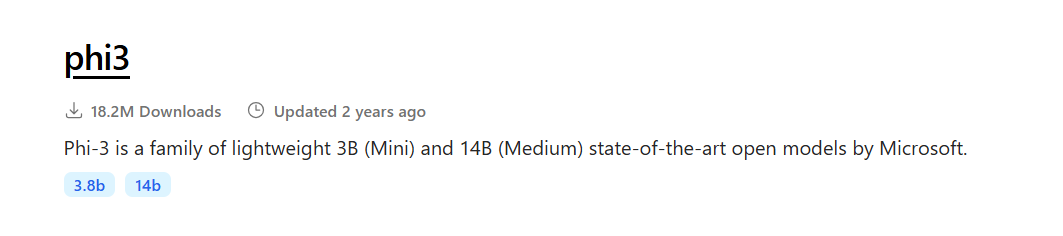
I pulled this model from Ollama’s model repository, and the screenshot below shows the tags associated with phi3:mini.
Now look at the tags for llama3.2:

Did you notice? The tags for llama3.2 show that it supports tools, unlike phi3:mini.
That was easy, but it might not be obvious at first glance. Always check the model’s documentation to confirm its capabilities.
Further readings
As always, let’s see some useful resources for further reading.
First, the documentation on Microsoft Learn. Honestly? I think that the article you just read explores the topic in much more depth than the official documentation, but it’s always good to have both perspectives.
🔗 Using function tools with an agent | Microsoft Learn
Then, we saw that we can use MCP Clients as tools to interact with the agent. Have a look at the SDK for more details.
This article first appeared on Code4IT 🐧
The official example on GitHub shows only one single static tool, but at least it’s a complete example.
🔗 Agent Framework .NET samples | GitHub
Finally, here’s the list of all the articles in this series.
- Microsoft Agent Framework for .NET (part 1): what it is, how it works, and when to use it
- Microsoft Agent Framework for .NET (part 2): How to use IChatClient with Azure Foundry and Ollama in .NET
- Microsoft Agent Framework for .NET (part 3): Custom Agents, for building a chat with custom instructions
- Microsoft Agent Framework for .NET (part 4): static methods, instance methods, MCP Clients as custom Agent tools
Wrapping up
Tools are an excellent way to extend, and, at the same time, restrict the capabilities of your agent to trusted operations, ensuring both flexibility and security in your applications.
Yet they are hard to track: as you saw, AI models sometimes choose paths that bypass the tools you have defined; monitoring and validating how a Model interacts with your tools is crucial for maintaining security and reliability.
I hope you enjoyed this article! Let's keep in touch on LinkedIn, Twitter or BlueSky! 🤜🤛
Happy coding!
🐧