

Microsoft Agent Framework for .NET (part 3): Custom Agents, for building a chat with custom instructions
Learn how to create a custom AI Agent in Microsoft Agent Framework for .NET with a name and custom instructions. And then, learn how to handle multi-turn conversations and improve responses through better system prompts.
Table of Contents
Just a second! 🫷
If you are here, it means that you are a software developer. So, you know that storage, networking, and domain management have a cost .
If you want to support this blog, please ensure that you have disabled the adblocker for this site. I configured Google AdSense to show as few ADS as possible - I don't want to bother you with lots of ads, but I still need to add some to pay for the resources for my site.
Thank you for your understanding.
- Davide
Ok, chatbots like the one we created in the previous article are fun, but they are not very useful. They are generic assistants that can answer a wide range of questions, but they do not have a clear role or domain.
Didn’t you read the previous article? Then stop reading this one and go back to it first! It is part of the same series and a prerequisite for this one.
- Microsoft Agent Framework for .NET (part 1): what it is, how it works, and when to use it
- Microsoft Agent Framework for .NET (part 2): How to use IChatClient with Azure Foundry and Ollama in .NET
- Microsoft Agent Framework for .NET (part 3): Custom Agents, for building a chat with custom instructions
- Microsoft Agent Framework for .NET (part 4): static methods, instance methods, MCP Clients as custom Agent tools
Other than being useful, a good chatbot should also be consistent: for example, it should not change its tone or style from one answer to the next. Having an agent that has a role, a tone, a domain, and a clear mission and goal is better than having a generic assistant that sometimes talks like a teacher, sometimes like a salesperson, and sometimes like a random search engine, right?
That is exactly where custom instructions come into play.
In this article, we will see how to create specialized AI agents with Microsoft Agent Framework for .NET, assign them a name and a system prompt, send user messages to them, and iterate on those instructions to improve the quality of the output.
We will keep on working on the Board Game assistant we started creating in the previous article, but this time we will give the assistant more personality and a clear role.
The AIAgent abstraction is the base for all agents in Microsoft Agent Framework
In Microsoft Agent Framework, agents are implemented by concrete classes that inherit from AIAgent: let’s have a look at this abstraction, then, before moving on to the concrete chat agent.
Let’s begin with the definition of the AIAgent class, taken from the official documentation:
AIAgent serves as the foundational class for implementing AI agents that can participate in conversations and process user requests. An agent instance may participate in multiple concurrent conversations, and each conversation may involve multiple agents working together.
This simple description tells us a lot of interesting things, which may affect how you design and reuse your agents.
Let’s move on to what the AIAgent class can do.
It contains several methods and properties that are available for agents of various types. Among these methods, we can find:
RunAsync: it performs a single-turn interaction with the agent; depending on the overload, it can accept zero to multiple user messages, and it returns a single response from the agentRunStreamingAsync: is similar to theRunAsyncmethod, but it returns a streaming response from the agentCreateSessionAsync: creates a session that can be used to maintain context across multiple turns of conversation with the agent. We will see more on this later in the articleNameandId: properties that return the name and the ID of the agent, respectively. These are useful for logging, debugging, and orchestration
Name and Id can be useful while debugging: in fact, if you look at the class definition (you can find it on GitHub) you will see that it is decorated with a DebuggerDisplay attribute that shows the agent’s name and ID in the debugger.
[DebuggerDisplay("{DebuggerDisplay,nq}")]
public abstract partial class AIAgent
{
    [DebuggerBrowsable(DebuggerBrowsableState.Never)]
    private string DebuggerDisplay =>
        this.Name is { } name ? $"Id = {this.Id}, Name = {name}" : $"Id = {this.Id}";
With just these three methods, we can start creating concrete classes. So, the next question is: which concrete classes can we create?
We have several concrete classes available, including:
- Microsoft.Agents.AI.A2A.A2AAgent
- Microsoft.Agents.AI.ChatClientAgent
- Microsoft.Agents.AI.CopilotStudio.CopilotStudioAgent
- Microsoft.Agents.AI.DurableTask.DurableAIAgent
- Microsoft.Agents.AI.GitHub.Copilot.GitHubCopilotAgent
In this article, we will focus on the ChatClientAgent type.
How to create a ChatClientAgent with Microsoft Agent Framework for .NET
A ChatClientAgent is a wrapper around an IChatClient that adds a name, custom instructions, and some other metadata, allowing you to create specialized agents that can be reused across multiple parts of your application.
We just learned that ChatClientAgent is a concrete implementation of the AIAgent abstract class. So, let’s initialize an instance of ChatClientAgent and see how it works.
First, you need an IChatClient instance (we saw in the previous article how to create one). Then, you can use the ChatClientAgent constructor to create a new agent with a name and custom instructions.
public static ChatClientAgent CreateBoardGameAdvisorAgent(IChatClient chatClient)
{
    ChatClientAgent agent = new ChatClientAgent(chatClient,
        instructions: """
        You are BoardGameAdvisor, an expert in modern board games.

        Your goal is to recommend board games based on:
        - number of players
        - desired complexity: light, medium, or heavy
        - favorite genres or mechanics

        Rules:
        - Ask one short follow-up question if essential information is missing.
        - Recommend at most 3 games.
        - For each recommendation, explain why it fits.
        - Include player count, complexity, and typical play time.
        - If you are unsure about a specific rule, edition, or release detail, say so.
        - Keep the answer practical, friendly, and concise.
        """,
        name: "BoardGameAdvisor",
        description: "An expert assistant for recommending modern board games."
        );
    return agent;
}
So, yeah, it’s actually quite similar to the simple IChatClient. But now the instructions are part of the agent definition itself, so they can be reused across multiple conversations. Also, now we have a clear name for the agent, and we can then use it for logging, orchestration, and debugging.
Let’s update the Program.cs file to interact with the agent we just created.
IChatClient chatClient = InitializeChatClient(); // see previous article for details
ChatClientAgent agent = AgentsCreator.CreateBoardGameAdvisorAgent(chatClient);

while (true)
{
    Console.Write("> ");
    string? question = Console.ReadLine();

    if (question is null) // Ctrl+Z or input closed
        break;

    question = question.Trim();
    if (string.Equals(question, "exit", StringComparison.OrdinalIgnoreCase) ||
        string.Equals(question, "quit", StringComparison.OrdinalIgnoreCase))
    {
        break;
    }

    if (string.IsNullOrEmpty(question))
        continue;

    Console.WriteLine($"[[Question]]: {question}");

    try
    {
        AgentResponse response = await agent.RunAsync(question);
        Console.ForegroundColor = ConsoleColor.DarkYellow;
        Console.WriteLine($"[[Answer]]: {response}");
    }
    catch (Exception ex)
    {
        Console.ForegroundColor = ConsoleColor.Red;
        Console.WriteLine($"[[Error]]: {ex.Message}");
    }
    Console.ForegroundColor = defaultColor;
}

Console.WriteLine("Session terminated.");
Ok, I understand that there’s a lot of code that is basically noise. Let’s focus on the important parts:
ChatClientAgent agent = AgentsCreator.CreateBoardGameAdvisorAgent(chatClient);
AgentResponse response = await agent.RunAsync(question);
Console.WriteLine($"[[Answer]]: {response}");
We initialize a ChatClientAgent, we send it one question, and we get the response back. Easy peasy!
Exploring the AgentResponse class
We retrieved the response from the agent through the AgentResponse class. Let’s see what it contains.
If you place a breakpoint on the line where we call await agent.RunAsync(question), you can inspect the response variable in the debugger. We can see a couple of interesting properties, like:
AgentId: it’s the ID of the agent (but we don’t see its name! Weird!)Text: it’s the plain text of the response, which is what we printed to the console.ModelId: the name of the LLM used to generate the response.Usage: it contains the number of tokens used for the request and the response, which is useful for cost estimation and optimization.
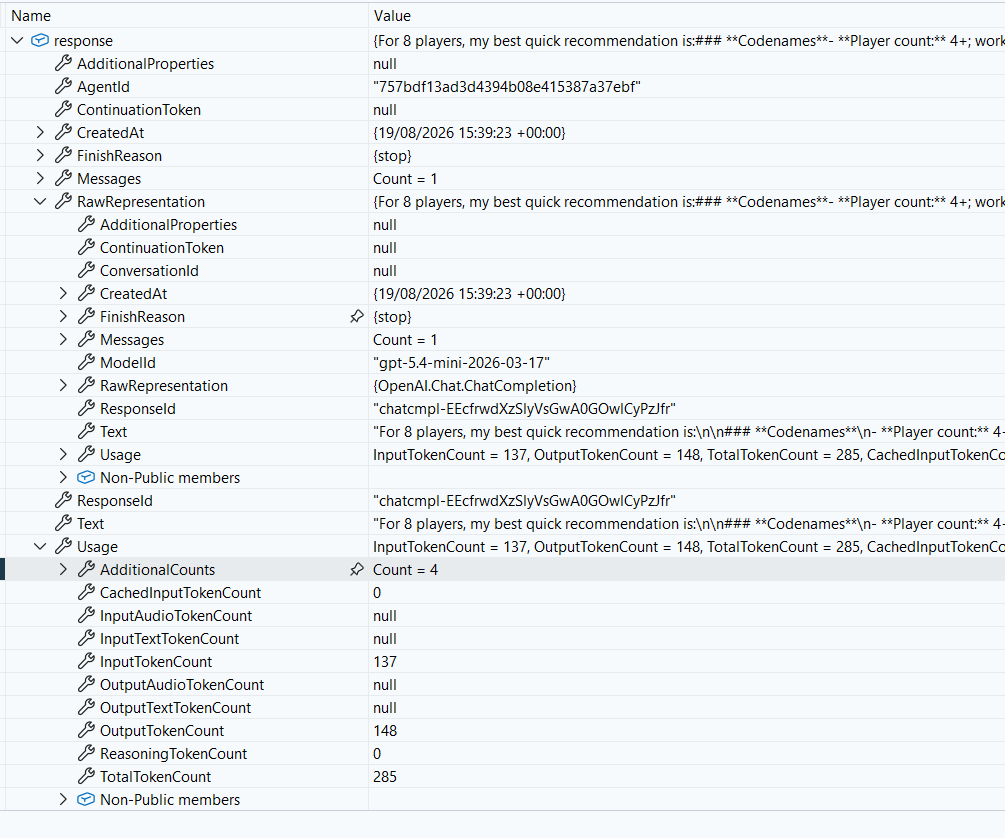
Tiny detail: if you noticed from the snippet above, I didn’t access the response.Text property directly, but I just printed the response variable. This is because the AgentResponse class overrides the ToString() method to return the text of the response.
// in Microsoft.Agents.AI.AgentResponse
public override string ToString() => this.Text;
So, when we print the response variable, we actually get the text of the response.
Making AI conversations more natural with Sessions
Let’s have a look at a quick conversation I had with the agent we just created.
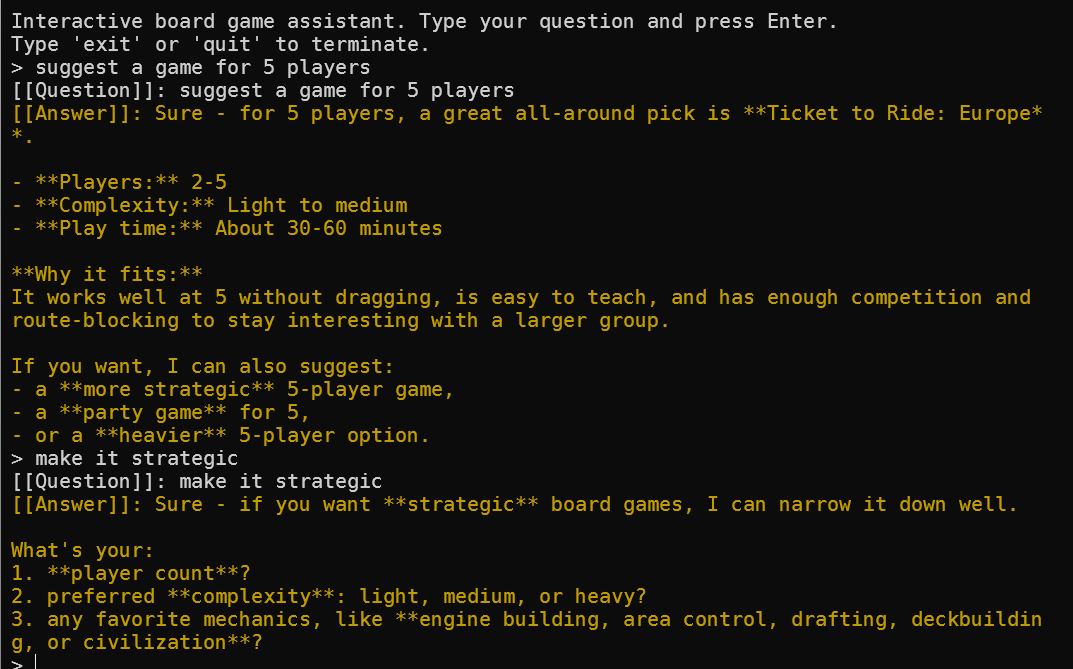
I first asked for a game for 5 players, and the agent gave me a good answer. Then, I specified I want a strategic game, and the agent asked me the number of players again. It forgot about the previous message!
This happens because I wasn’t using a session. The RunAsync method is stateless, so it doesn’t remember previous messages. If we want to have a more natural conversation, we need to use a session.
Let me update the previous snippet to use a session, generated by the agent itself:
ChatClientAgent agent = AgentsCreator.CreateBoardGameAdvisorAgent(chatClient);
AgentSession session = await agent.CreateSessionAsync();
AgentResponse response = await agent.RunAsync(question, session);
Console.WriteLine($"[[Answer]]: {response}");
Now, if I run the same conversation again, the agent will remember the previous messages and give me a more natural answer.
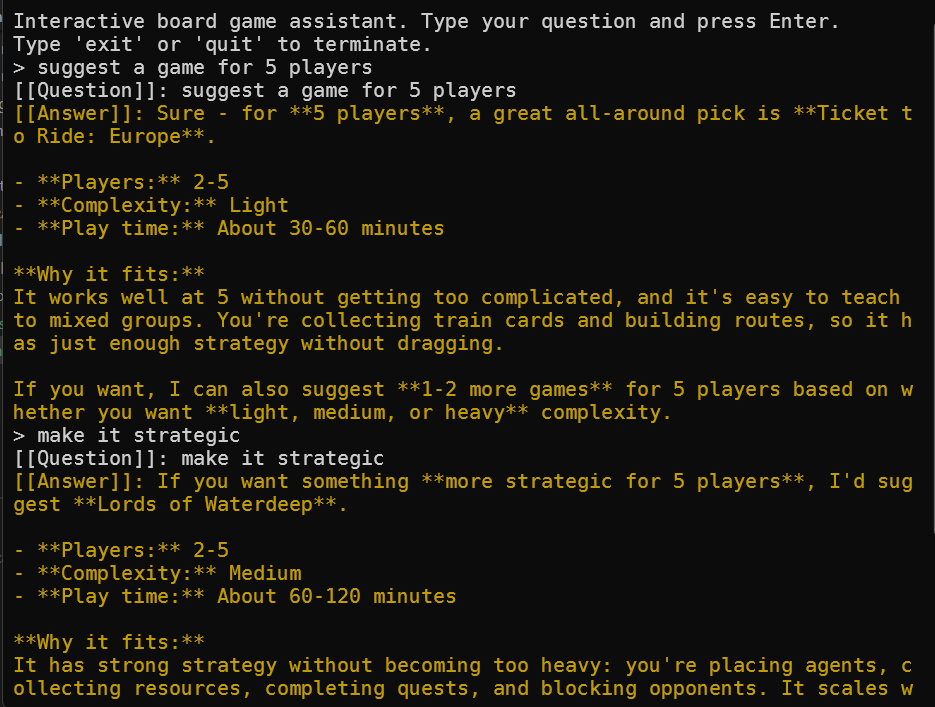
What’s inside a Session?
Ok, cool. But let’s dive into the session!
Whenever you start chatting with an AI agent, the session starts keeping track of the previous messages of the same conversation.
You can see more details about the conversation if you look at the debugger.
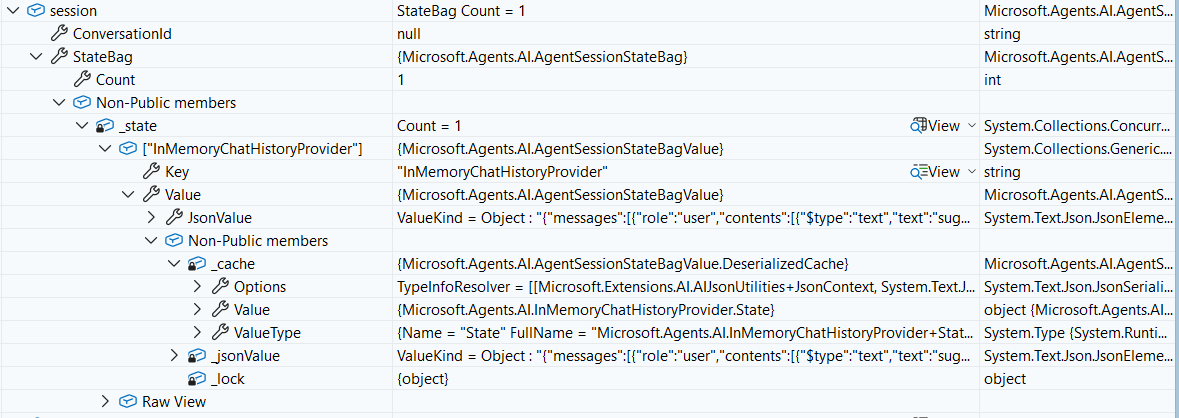
Internally, the conversation is stored in a JSON format, visible inside that StateBag property. If you are curious, here’s what it shows (you can just skim it):
{
    "messages": [
        {
            "role": "user",
            "contents": [
                {
                    "$type": "text",
                    "text": "suggest a game for 5 players"
                }
            ]
        },
        {
            "authorName": "BoardGameAdvisor",
            "createdAt": "2026-08-22T14:49:56+00:00",
            "role": "assistant",
            "contents": [
                {
                    "$type": "text",
                    "text": "Here are 3 good **medium-complexity** games that work well at **5 players**:\n\n1. **Ticket to Ride: Europe**\n   - **Players:** 2–5\n   - **Play time:** about 30–60 minutes\n   - **Why it fits:** Easy to learn, smooth at 5, and has just enough strategy without feeling heavy. Great if you want something accessible but still competitive.\n\n2. **Azul**\n   - **Players:** 2–5\n   - **Play time:** about 30–45 minutes\n   - **Why it fits:** A clean, tactical tile-laying game that scales nicely to 5. It’s more thinky than it looks, but still quick and elegant.\n\n3. **Rajas of the Ganges**\n   - **Players:** 2–5\n   - **Play time:** about 45 minutes\n   - **Why it fits:** Balanced engine-building and race mechanics that remain engaging at 5 players."
                }
            ],
            "messageId": "chatcmpl-EFKr6TRfKKAvhC7XYk88s57TiewUY"
        },
        {
            "role": "user",
            "contents": [
                {
                    "$type": "text",
                    "text": "medium"
                }
            ]
        },
        {
            "authorName": "BoardGameAdvisor",
            "createdAt": "2026-08-22T14:50:11+00:00",
            "role": "assistant",
            "contents": [
                {
                    "$type": "text",
                    "text": "Here are 3 good **medium-complexity** games that work well at **5 players**:\n\n1. **Ticket to Ride: Europe**\n   - **Players:** 2–5\n   - **Play time:** about 30–60 minutes\n   - **Why it fits:** Easy to learn, smooth at 5, and has just enough strategy without feeling heavy. Great if you want something accessible but still competitive.\n\n2. **Azul**\n   - **Players:** 2–5\n   - **Play time:** about 30–45 minutes\n   - **Why it fits:** A clean, tactical tile-laying game that scales nicely to 5. It’s more thinky than it looks, but still quick and elegant.\n\n3. **Rajas of the Ganges**\n   - **Players:** 2–5\n   - **Play time:** about 45 minutes\n   - **Why it fits:** Balanced engine-building and race mechanics that remain engaging at 5 players."
                }
            ],
            "messageId": "chatcmpl-EFKrLs7lixl4rmDzdRcuPGDieyXSa"
        },
        {
            "role": "user",
            "contents": [
                {
                    "$type": "text",
                    "text": "more on cooperation"
                }
            ]
        },
        {
            "authorName": "BoardGameAdvisor",
            "createdAt": "2026-08-22T14:50:56+00:00",
            "role": "assistant",
            "contents": [
                {
                    "$type": "text",
                    "text": "Absolutely — for **5 players** and **more cooperative play**, these are strong picks:\n\n1. **Pandemic**\n   - **Players:** 2–4 officially, but **5-player support is not in the base game**  \n   - **Play time:** about 45 minutes\n   - **Why it fits:** Excellent cooperative gameplay, but I’m not sure of a standard official 5-player base-game setup, so I wouldn’t recommend it specifically for 5 without checking your edition/variant.\n\n2. **The Crew: Mission Deep Sea**\n   - **Players:** 3–5\n   - **Play time:** 20–40 minutes\n   - **Why it fits:** True co-op trick-taking game that supports 5 players well and scales naturally; tense and clever without being heavy.\n\n3. **Ark Nova: Marine Worlds**\n   - **Players:** 1–5 with the expansion (check edition details)\n   - **Play time:** about 90–150 minutes (base Ark Nova is heavier)\n   - **Why it fits:** Deep, strategic, and has cooperative variants or team-play options in some groups/variants, but it is heavier than the other options.\n\nIf you want a short list focused strictly on solid 5-player cooperative support, I’d recommend:\n- **The Crew: Mission Deep Sea** if you want true co-op and 5-player support.\n- If you want a more classic board-game-style co-op at 5, tell me whether you’re open to **semi-coop** or DL (dedicated large-group) variants and I’ll refine the picks."
                }
            ],
            "messageId": "chatcmpl-EFKr6TRfKKAvhC7XYk88s57TiewUZ"
        }
    ]
}
The three important parts are:
authorName: for the Agent, it’s the same name we defined when we instantiated it; the user has no name;role: it tells you who is the user and who is the Agent (whose role is assistant);contents, the content of the response.
The contents element, in my opinion, is particularly interesting for two reasons.
First, it’s a text, meaning that other types of response exist. Second, it’s an array: it means that a response can contain more than one element. If we connect the dots, we can see that a chat response can, for example, return a text message and an image.
But we will see more on this in a future article (maybe!).
How to store and rehydrate Sessions
Ever wondered how it is possible that you start chatting with an AI tool, then close the browser, and when you return the conversation is still there, so that you can continue chatting as if you never left?
That happens because the system stored the session somewhere. When you return to the same chat, instead of sending the whole conversation again to the AI tool, it resumes where you left off.
In Microsoft Agent Framework, you can implement this scenario. In fact, you can serialize a session by calling
JsonElement serializedSession = await agent.SerializeSessionAsync(session);
and store it somewhere.
Then, when the time comes, you can deserialize it by calling
AgentSession restoredSession = await agent.DeserializeSessionAsync(serializedSession);
and use it again to restore the conversation. Easy!
The system prompt matters more than the agent name
Giving an agent a name is helpful, but the name alone does not make the behavior better.
If we wrote something vague like this:
You recommend board games.
we would probably get answers that are too generic. Still useful, yes, but not that usable.
As a general rule of thumb, a good prompt should describe, at least:
- the role: “You are BoardGameAdvisor”
- the domain: modern board games
- the expected input: players, complexity, genres/mechanics
- the constraints: maximum 3 recommendations
- the output style: practical, concise, with a short explanation
This is the real difference between a generic assistant and a domain-specific agent.
You’ve probably heard stories about agents that perform operations and take too much freedom. This is why it’s important to specify strict constraints for the agent.
Repeat after me: the quality of your agent is heavily influenced by the quality of its instructions.
Best practices for writing better custom instructions
Here are some of the habits that usually make the biggest difference between defining generic instructions and defining good instructions.
Be specific about the agent’s job
“You are a helpful assistant” is too vague.
“You are an assistant specialized in recommending modern board games” is already much better.
The narrower the role, the easier it is for the model to stay consistent.
Separate stable rules from user-specific preferences
The system prompt should define the stable behavior of the agent.
For example:
- always ask for missing player count
- always explain recommendations
- always keep the tone concise
Conversely, the user should be able to send messages that contain the variable data:
- 2 players or 5 players
- co-op or competitive
- light or heavy
- 30 minutes or 2 hours
Define a clear boundary between the stable rules of the agent and what the user can control.
Define the output shape
If you want predictable answers, say so explicitly.
For instance, you can ask the agent to always return:
- game name
- why it fits
- player count
- complexity
- play time
Without this guidance, the agent may still answer well, but the structure will likely change from one reply to the next. We will see in a future article how to shape responses in a more structured way.
Tell the agent what to do when information is missing
Sometimes, agents don’t have enough information to fulfill a request.
For example, if the user writes only “Suggest me a game”, the agent should not pretend to know everything, nor arbitrarily choose the type of game the user might be interested in.
In many scenarios, a good instruction to add is:
Ask one short follow-up question if essential information is missing.
Add honesty rules
Domain-specific agents sound confident very quickly, maybe too much.
We know that LLMs sometimes make up information when they do not know the answer.
If you care about correctness, add constraints like:
- do not invent editions or release years
- if uncertain, say that you are uncertain
- prefer safe, broadly known recommendations over risky guesses
These instructions do not eliminate hallucinations, but they usually reduce the damage. Also, they make it evident that LLMs are not oracles, and that they can be wrong. Lastly, once you know what the agent is uncertain about, you can fill in the gaps by providing other ways to retrieve missing information.
In short, knowing what the agent does not know is often more useful than knowing what it thinks it knows.
Iterating on the prompt to improve output quality
Prompt iteration should be treated like any other engineering activity: observe the output, identify recurring issues, refine the instructions, and test again.
Let’s say version 1 of the prompt is this:
You are BoardGameAdvisor. Recommend board games.
It works, but it is weak. You might get:
- too many suggestions
- no explanation of trade-offs
- no follow-up question when data is missing
- recommendations that ignore the requested complexity
A better version could be this:
You are BoardGameAdvisor, an expert in modern board games.
Recommend at most 3 games based on player count, complexity, and genre.
Ask one follow-up question if the request is missing essential details.
For each game, include why it fits, player count, complexity, and average play time.
If uncertain about a rule or edition, say so explicitly.
Keep the answer concise and practical.
Notice what changed: now we have defined the domain, limited the number of results, and specified the decision criteria. We have a clear indication of the response format (the information we want the agent to return), and we added an uncertainty policy.
This is usually how prompt quality improves: not with magic wording, but with clearer requirements.
A practical tip: test instructions with realistic user messages
Do not validate prompts only with perfect, well-structured inputs.
Real users write things like:
- “Need a game for tonight, 6 people, not too hard”
- “Something like Azul but for 2 players”
- “A co-op game for mixed experience levels”
These inputs are vague, incomplete, and full of assumptions. That is exactly why they are useful for testing.
If the agent behaves well on messy real-world prompts, then your instructions are probably doing their job.
Further readings
As I mentioned, this is part of a series of articles I’m writing about Microsoft Agent Framework. You can find all the articles of this series here:
- Microsoft Agent Framework for .NET (part 1): what it is, how it works, and when to use it
- Microsoft Agent Framework for .NET (part 2): How to use IChatClient with Azure Foundry and Ollama in .NET
- Microsoft Agent Framework for .NET (part 3): Custom Agents, for building a chat with custom instructions
- Microsoft Agent Framework for .NET (part 4): static methods, instance methods, MCP Clients as custom Agent tools
But maybe you are interested in diving deeper into how to create Agents with MAF. Well, here’s a good starting point:
🔗 Quickstart: build your first agent | Microsoft Learn
Curious about Microsoft Agent Framework’s GitHub repository?
🔗 microsoft/agent-framework on GitHub
This article first appeared on Code4IT 🐧
One last thing! As we saw, when you debug your agent you can have access to the Name and Id properties thanks to the DebuggerDisplay attribute. What is that? How can you add custom strings to simplify how you debug your applications?
🔗 Simplify debugging with DebuggerDisplay attribute in .NET | Code4IT
Wrapping up
In this article, we created a BoardGameAdvisor agent with Microsoft Agent Framework for .NET and saw how name and, even more, custom instructions define the agent’s identity and behavior.
We learned that the most important part is not the fancy agent name, but the quality of the system prompt: a good prompt defines the domain, clarifies the expected inputs, constrains the output, and tells the agent how to behave when information is missing.
Finally, we saw how to send user messages, preserve context across multiple turns, and iteratively improve the instructions based on real conversations.
Try building your own specialized agent with a very narrow domain first: define the persona, write precise instructions, test with realistic user messages, and refine the prompt until the answers become consistently useful.
I hope you enjoyed this article! Let's keep in touch on LinkedIn, Twitter or BlueSky! 🤜🤛
Happy coding!
🐧