

Testing beyond your imagination: Property-based testing in C# with FsCheck
Property-based testing is a powerful alternative to example-based testing. Instead of defining specific inputs and verifying their outcomes, you define properties that should always hold true. Let’s learn how to use FsCheck to write property-based tests in C# with NUnit.
Table of Contents
Just a second! 🫷
If you are here, it means that you are a software developer. So, you know that storage, networking, and domain management have a cost .
If you want to support this blog, please ensure that you have disabled the adblocker for this site. I configured Google AdSense to show as few ADS as possible - I don't want to bother you with lots of ads, but I still need to add some to pay for the resources for my site.
Thank you for your understanding.
- Davide
If you are like me, when you write a unit test, you pick a specific input, run the code, and assert a specific output. That works, surely, but it only tells you that your code behaves correctly for the exact example you thought of. The quality of your test suite then depends on your imagination: the more you can think of edge cases, the more comprehensive your tests will be.
What if there is an edge case you never considered? What if your code breaks only when an integer value is int.MaxValue? What if you’re comparing strings but you didn’t take into account the Turkish I problem?
In this article, you will learn:
- What property-based testing is and how it differs from traditional example-based testing
- How to identify useful properties, using board game mechanics as our domain
- How to write concrete property-based tests with FsCheck, starting from simple invariants and moving to more complex generators
We will use board games as a domain for our examples (have I ever mentioned I love board games?): we will try to identify some invariants, and we will write some property-based tests with FsCheck and NUnit.
Let’s begin!
Example-based testing vs Property-based testing
Most developers are very familiar with example-based testing, even if they don’t know that name. In short, you pick an input, run the system under test, and assert a precise expected output.
For example:
[Test]
public void CalculateScore_SingleScrabbleTile_ReturnsCorrectPoints()
{
    int score = ScrabbleScoreCalculator.CalculateScore("A");
    Assert.That(score, Is.EqualTo(1));
}
This test is useful, of course. But notice what it does not test: what happens with lowercase letters? What happens with an empty string? What about a string of 100 tiles? You can keep adding test cases, but for sure you won’t be able to identify all edge cases. And, well, this is where bugs can hide.
Property-based testing looks at the problem from a different angle: “What must always be true about this function, regardless of the input?” For the score calculator above, some properties you might identify are:
- Non-negativity: the score of any valid word is never negative
- Monotonicity: adding more tiles to a word never decreases its score
- Symmetry: Scrabble score is order-independent. For example, the score of “CAT” equals the score of “TAC”
Instead of picking specific examples, you describe these rules, and the framework generates a large number of random inputs to try to falsify them.
Here is a rough comparison:
| Example-based testing | Property-based testing | |
|---|---|---|
| Input | You choose specific values | Framework generates random values |
| Assertion | Exact expected output | A rule that must hold for any input |
| Coverage | Limited to the examples you wrote | Explores a wide input space automatically |
These two styles are complementary, not competing. In fact, example-based testing is still the best when you have to test known behaviours that represent business rules or interactions between components, while property-based testing works best when you can define invariants, you want to verify round-trips are valid (eg: serialization + deserialization), and you need to verify algebraic properties.
Ideally, you will want both in a mature test suite. And, since you are testing specific entities, the frosting on the cake would be to use the Testing Vial as a way to describe your entities given how they are tested.
Finding good properties: board games as our domain
Before writing any code, the hardest part of property-based testing is identifying properties worth testing. Let’s use board game mechanics to build the intuition.
Here are four categories of properties you will encounter frequently:
Invariants
An invariant is something that must always be true, no matter what.
For example, we can say that
a standard Scrabble tile bag always contains exactly 100 tiles
After any sequence of draw and return operations on the bag, the total number of tiles across the bag and all players’ hands should remain 100. If your code violates this invariant, even for one single combination of operations, then your game logic is broken.
Round-trip properties
A round-trip property states that applying an operation and then its inverse gives you back the original value.
If you serialize a
BoardGamerecord to JSON and then deserialize it back, you get an identical record.
Or in our game analogy:
If player A gives a card to player B, and then player B gives the same card back to player A, player A’s hand is identical to the original.
Maybe this one is the least fancy, but it can be surprisingly useful.
Ordering and monotonicity
This sort of invariant defines how things change over time.
Dealing more cards to a player never decreases their hand size.
The flow of time always has an effect on a system. Having clear in mind what happens can help you ensure that the system behaves correctly.
Symmetry and commutativity
Sometimes, the order of operations does not change the final result. “A + B” is still “B + A”.
In the board games world we can say that:
The Scrabble score of a word does not depend on the order of the tiles.
Or
The final score in Castle Combo is the same regardless of the order in which victory points are counted.
How to install FsCheck with NUnit
Assuming you already have a .NET test project using NUnit, you can add the FsCheck NuGet packages by running:
dotnet add package FsCheck
dotnet add package FsCheck.NUnit
Well, you can actually just install FsCheck.NUnit, as FsCheck is a transitive dependency.
FsCheck.NUnit provides the [Property] attribute that makes FsCheck tests look and feel just like regular NUnit tests.
You do not need any special global setup. FsCheck integrates directly with the NUnit test runner via the [Property] attribute. Just pay attention that you must use FsCheck.NUnit.Property, not NUnit.Framework.Property!
Writing your first property-based tests
Let’s start with the Scrabble score calculator. Here is the production code we will be testing:
public class ScrabbleScoreCalculator
{
    private static readonly Dictionary<char, int> _tileValues = new()
    {
        ['A'] = 1, ['E'] = 1, ['I'] = 1, ['O'] = 1, ['U'] = 1,
        ['L'] = 1, ['N'] = 1, ['S'] = 1, ['T'] = 1, ['R'] = 1,
        ['D'] = 2, ['G'] = 2, ['B'] = 3, ['C'] = 3, ['M'] = 3,
        ['P'] = 3, ['F'] = 4, ['H'] = 4, ['V'] = 4, ['W'] = 4,
        ['Y'] = 4, ['K'] = 5, ['J'] = 8, ['X'] = 8,
        ['Q'] = 10, ['Z'] = 10,
    };

    public static int CalculateScore(string word)
    {
        if (string.IsNullOrEmpty(word)) return 0;
        return word.ToUpper().Sum(c => _tileValues.TryGetValue(c, out int v) ? v : 0);
    }
}
Now let’s write a property-based test using FsCheck and NUnit:
using FsCheck;
using FsCheck.NUnit;
using NUnit.Framework;

[TestFixture]
public class ScrabbleScoreCalculatorTests
{

    [FsCheck.NUnit.Property]
    public bool Score_IsAlwaysNonNegative(string word)
    {
        int score = ScrabbleScoreCalculator.CalculateScore(word);
        return score >= 0;
    }
}
That’s it. When NUnit runs this test, FsCheck generates a configured number of random string values for word (100 by default) and checks that the returned bool is true for each one. If any generated value produces a false, FsCheck reports a failure and tells you exactly which value caused it.
Notice the shape: the test method takes a parameter (the randomly generated input) and returns a bool (the property that must hold). This is the core FsCheck pattern. You are not writing any assertion, and you are not specifying any input data. Everything is done automatically!
What happens when a property fails?
Suppose that we accidentally introduced a bug in the score calculator that associates -10 to the letter ‘Z’, instead of the correct value (10).
FsCheck will find a counterexample quickly:
private static readonly Dictionary<char, int> _tileValues = new()
{
    // all the other values...
+    ['Z'] = 10,
-    ['Z'] = -10,
};
Now, when you run the Score_IsAlwaysNonNegative test, FsCheck will report a failure:
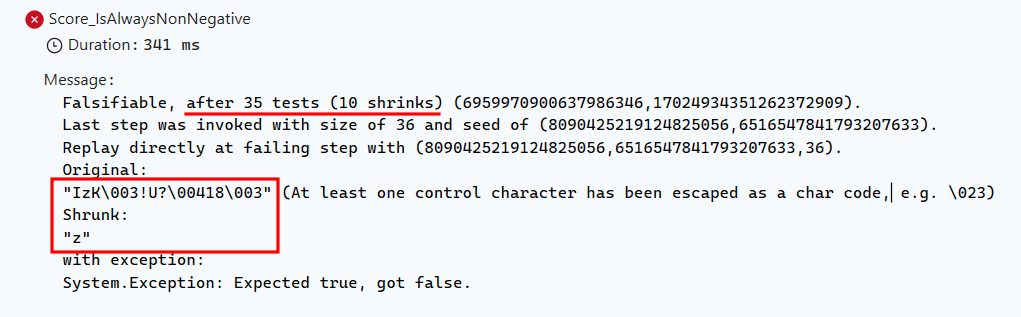
so it failed with the input “IzK\003!U?\00418\003”. I bet you wouldn’t have thought of that input when writing your example-based tests!
You can also see that the screenshot mentions “Falsifiable, after 35 tests (10 shrinks)”. What does it mean? What is “shrinking”? We’ll cover that soon.
Changing the number of checks and the parallelization level in FsCheck
By default, FsCheck runs 100 checks. You can increase that as much as you need with the MaxTest parameter on the [FsCheck.NUnit.Property] attribute.
[FsCheck.NUnit.Property(MaxTest = 1000)]
public bool Score_IsAlwaysNonNegative(string word)
{
    // ...
}
But be careful: the more checks you run, the longer your test suite will take. A good rule of thumb is to start with 100 and increase only if you feel that your property is not being tested enough.
Luckily, you can still parallelize the checks to speed up the test run. By default, FsCheck runs 4 checks in parallel. You can change that with the Parallelism parameter:
[FsCheck.NUnit.Property(MaxTest = 1000, Parallelism = 8)]
public bool Score_IsAlwaysNonNegative(string word)
{
    // ...
}
A simple scenario: Testing the symmetry property
Now let’s verify that the Scrabble score is order-independent.
As you know, shuffling the letters of a word does not change its total score.
[FsCheck.NUnit.Property]
public bool Score_IsIndependentOfLetterOrder(string word)
{
    if (string.IsNullOrEmpty(word)) return true; // skip degenerate case

    var shuffled = new string(word.OrderBy(_ => Guid.NewGuid()).ToArray());
    return ScrabbleScoreCalculator.CalculateScore(word) == ScrabbleScoreCalculator.CalculateScore(shuffled);
}
This test generates random words, shuffles their characters randomly, and asserts that both scores are equal. If your implementation accidentally weights certain positions in a word, FsCheck will find a counterexample quickly.
Have you noticed that weird if (string.IsNullOrEmpty(word)) return true; line at the beginning of the property? Well, this is a short-circuit check for empty or null values. It tells FsCheck “this input is out of scope; skip it and count it as a successful test.”
A more complex scenario: Testing deck invariants defining a custom model
Let’s move to a more complex example: a card deck for a generic collectible card game.
Here is the domain:
public record Card(string Name, int Cost, int Points);

public class CardDeck
{
    private readonly List<Card> _cards;

    public CardDeck(IEnumerable<Card> cards) => _cards = cards.ToList();

    public int Count => _cards.Count;

    public (Card drawn, CardDeck remaining) Draw()
    {
        if (_cards.Count == 0)
            throw new InvalidOperationException("Cannot draw from an empty deck.");

        var top = _cards[0];
        return (top, new CardDeck(_cards.Skip(1).ToList()));
    }

    public CardDeck Add(Card card) => new CardDeck(_cards.Append(card).ToList());

    public int TotalPoints() => _cards.Sum(c => c.Points);
}
Now, consider this invariant:
Drawing a card from a deck and then adding that exact card back produces a deck with the same total points
[FsCheck.NUnit.Property]
public Property DrawAndReturn_PreservesTotalPoints(NonEmptyArray<Card> cards)
{
    var deck = new CardDeck(cards.Get);

    var (drawn, remaining) = deck.Draw();
    var restored = remaining.Add(drawn);

    return (restored.TotalPoints() == deck.TotalPoints())
        .ToProperty()
        .Label("Total points must be preserved after draw+return");
}
There are a few things to note here:
NonEmptyArray<T>is a built-in FsCheck wrapper that tells the generator “give me an array with at least one element.” This lets us skip the empty-deck guard without filtering;ToProperty()converts aboolto aProperty, which lets you attach a.Label(...). A label is a human-readable description shown in the failure message (see screenshot below);- FsCheck already knows how to generate
string,int, and most primitives, so it can generateCardrecords automatically, as long as all their constructor parameters are of known types; ToPropertyandLabelare extension methods that come from the FsCheck.Fluent namespace.
Now we can try to falsify this property: let me modify the TotalPoints method:
  private readonly List<Card> _cards;
  public CardDeck(IEnumerable<Card> cards) {
    _cards = cards.ToList();
  }

- public int TotalPoints() => _cards.Sum(c => c.Points);
+ public int TotalPoints() => _cards.Sum(c => c.Points) + Random.Shared.Next();
Now we have a random component in our total points calculation, which will break the invariant we previously defined. In fact, if we execute the same test again, it will fail:
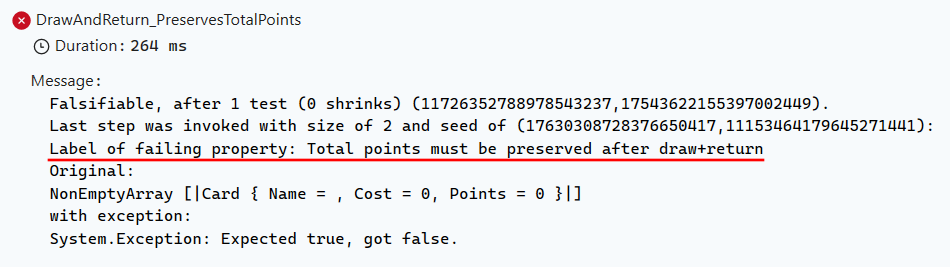
Notice that it mentions the label we attached earlier, helping us understand which property failed.
How to write a custom generator with FsCheck
Sometimes the default generators produce values that do not fit your domain. FsCheck makes it easy to register custom generators, called Arbitraries.
Let’s say we want to generate only Card instances where the cost is between 0 and 10, and the points are between 0 and 5.
public static class CardArbitrary
{
    public static Arbitrary<Card> Card()
    {
        var nameGen = Gen.Elements("Village", "Smithy", "Market", "Festival", "Laboratory");
        var costGen = Gen.Choose(0, 10);
        var pointsGen = Gen.Choose(0, 5);

        var cardGen =
            from name in nameGen
            from cost in costGen
            from points in pointsGen
            select new Card(name, cost, points);

        return Arb.From(cardGen);
    }
}
You can think of the Arbitrary as a Fixture. But, unlike fixtures, you cannot apply it to the whole class, but you have to add the reference to each and every test method:
[FsCheck.NUnit.Property(Arbitrary = new[] { typeof(CardArbitrary) })]
public Property DrawAndReturn_PreservesTotalPoints(NonEmptyArray<Card> cards)
{
    // ... same as before, but now Card values come from CardArbitrary.Card()
}
Now every Card generated in this test method will respect your domain constraints.
Shrinking in FsCheck: finding the minimal failing input
One of FsCheck’s most known features is shrinking. When FsCheck finds a failing input, it does not just report the raw random value (which might be a 500-character string or a 200-element array). Instead, it automatically tries to find the smallest input that still reproduces the failure.
For example, in the example we saw before, it started failing because the letter Z happened to have a negative value. If you look at the screenshot, it started shrinking the input string that caused the failure down to the shortest word that still fails (in our case, it was just the “Z”). This makes debugging dramatically easier.
Shrinking is built into FsCheck for all primitive types. But what if you have a custom type?
How to create custom Shrinkers for Arbitrary types
Well, in that case, while you are defining a custom Arbitrary, you can also define a custom shrinker for that type. This allows FsCheck to automatically try smaller versions of your custom type when a test fails, making it easier to pinpoint the minimal failing case.
Let’s try adding a shrinker to our Card arbitrary:
    public static Arbitrary<Card> Card()
    {
        var nameGen = Gen.Elements("Village", "Smithy", "Market", "Festival", "Laboratory");
        var costGen = Gen.Choose(0, 10);
        var pointsGen = Gen.Choose(0, 5);

        var cardGen =
            from name in nameGen
            from cost in costGen
            from points in pointsGen
            select new Card(name, cost, points);


        IEnumerable<Card> ShrinkCard(Card c)
        {
            // produce shrinks where Points is strictly decreasing on each candidate
            for (int newPoints = c.Points - 1; newPoints >= 0; newPoints--)
            {

                Console.WriteLine($"Shrinking to new Points={newPoints}");
                yield return new Card(c.Name, c.Cost, newPoints);
            }
        }

        return Arb.From(cardGen, ShrinkCard);
    }
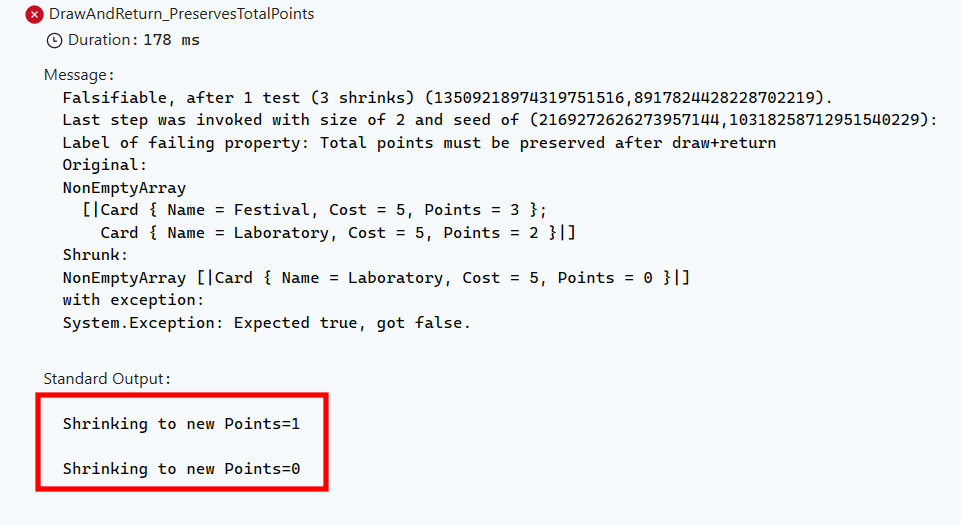
Now the ShrinkCard method produces new Card instances with strictly decreasing Points, helping FsCheck find minimal failing cases more effectively.
Notice that Console.WriteLine? We can use it to observe the shrinking process in action when running our tests, which can be helpful for debugging and understanding how FsCheck is attempting to minimize failing cases.
FsCheck can work with traditional NUnit assertions
You do not have to return bool or Property from every FsCheck test. You can also use Prop.ForAll with classic NUnit Assert calls inside:
[Test]
public void Score_IsNeverNegative_UsingForAll()
{
    var property = Prop.ForAll<string>(word =>
    {
        int score = ScrabbleScoreCalculator.CalculateScore(word);
        Assert.That(score, Is.GreaterThanOrEqualTo(0));
        Assert.That(word.Length, Is.GreaterThanOrEqualTo(0));
    });

    property.QuickCheckThrowOnFailure();
}

[Test]
public void DeckTotalPoints_IsPreserved_AfterDrawAndReturn()
{
    var property = Prop.ForAll<NonEmptyArray<Card>>(cards =>
    {
        var deck = new CardDeck(cards.Get);
        var (drawn, remaining) = deck.Draw();
        var restored = remaining.Add(drawn);
        Assert.That(restored.TotalPoints(), Is.EqualTo(deck.TotalPoints()));
    });
    property.QuickCheckThrowOnFailure();
}
In both cases, we used the Prop.ForAll method (which comes from FsCheck) to generate instances of the objects and define properties that should hold for all generated inputs.
This approach is useful when you want to reuse your existing assertion helpers, or when the property is easier to express as a series of assertions rather than a boolean expression.
As you may have noticed from the first example, you can use multiple assertions within a single property.
Finally, that property.QuickCheckThrowOnFailure call is what triggers the actual execution of the property-based test and throws an exception if any generated input violates the property.
When to use property-based testing
Property-based testing is a fantastic tool. But, as always, it’s just a tool, and it cannot solve all your problems.
So, you can consider using property-based testing when:
- You can describe invariants that must hold for any valid input (like non-negativity, size constraints, ordering)
- You are testing round-trip behaviour (serialize and deserialize, encode and decode, deal and return)
- You want to validate algebraic properties (commutativity, associativity, idempotency)
- Your domain has a large input space and hand-picking examples feels arbitrary
- You suspect there are edge cases you have not thought of yet
But, still, example-based testing is useful when
- The behaviour depends on very specific values (e.g., “if the player name is ‘Admin’, redirect to the admin panel”)
- You are testing against a known, finite set of business rules that are fully enumerated
- The cost of writing and maintaining a custom generator outweighs the benefit
- You need to document a specific scenario clearly for future readers
In practice, the two approaches complement each other naturally. Use property-based tests to verify invariants and catch unexpected edge cases, and use example-based tests to nail down specific business scenarios.
Further readings
The official FsCheck documentation is a nice starting point, but with a huge problem (to me): its examples are mainly using F# (well, you could’ve guessed that from the name). Still, you might want to give it a look.
🔗 FsCheck QuickStart - Official documentation
Property-based testing fits naturally alongside other test types. If you are thinking about how to structure your overall test suite, not just sticking to the testing pyramid, here are two articles you might like:
🔗 Testing Pyramid vs Testing Diamond (and how they affect Code Coverage) | Code4IT
If you are exploring other non-classical test types in C#, you might also be interested in Snapshot Tests:
🔗 No more regressions with Snapshot Tests in C# using Verify: a practical guide | Code4IT
Unit tests are not enough on their own. Here is a look at how to write cleaner unit tests without over-relying on interfaces and mocks:
🔗 4 ways to create Unit Tests without Interfaces in C# | Code4IT
For the NUnit side of things, Microsoft’s testing documentation is also worth bookmarking:
🔗 Unit testing C# with NUnit and .NET | Microsoft Learn
This article first appeared on Code4IT 🐧
Wrapping up
In this article, we explored property-based testing, a technique that shifts your thinking from “does this specific example produce this specific output?” to “does this rule hold for any input my code might receive?”
If you have never written a property-based test before, I encourage you to try adding just one to your existing test suite this week. Pick any method, think of one invariant, and use [Property] with a single bool-returning method. The experience of watching FsCheck find an edge case you never thought of is quite eye-opening.
Just don’t forget that Property-based testing complements example-based testing; it does not replace it.
I am curious: do you already use property-based testing in your projects? Have you ever had FsCheck find a bug that your hand-written tests missed? Let me know in the comments!
I hope you enjoyed this article! Let's keep in touch on LinkedIn, Twitter or BlueSky! 🤜🤛
Happy coding!
🐧